
Sellfy Review: Is It Worth Using as a Creator?
If you’re a creator trying to turn your audience into actual income, you’ve probably had this thought at least once:
“I just want a simple place where people can buy my stuff… without me becoming a web developer.”
That’s basically where Sellfy comes in. It’s an online store platform designed for people who make things — digital products, merch, memberships — and don’t want to drown in tech headaches. Instead of giving you a crazy complicated dashboard packed with settings you’ll never touch, Sellfy tries to strip things down to what actually matters: upload product, set a price, share the link, get paid.

In this review, I’ll walk through what it’s like to use Sellfy day to day, its main features, what it does well, where it’s not perfect, and the types of creators who will benefit the most.
What Exactly Is Sellfy?
Sellfy is an ecommerce platform built primarily for digital-first creators. Think designers selling templates, photographers offering presets, musicians launching beat packs, coaches selling digital courses, or influencers launching their first merch line.
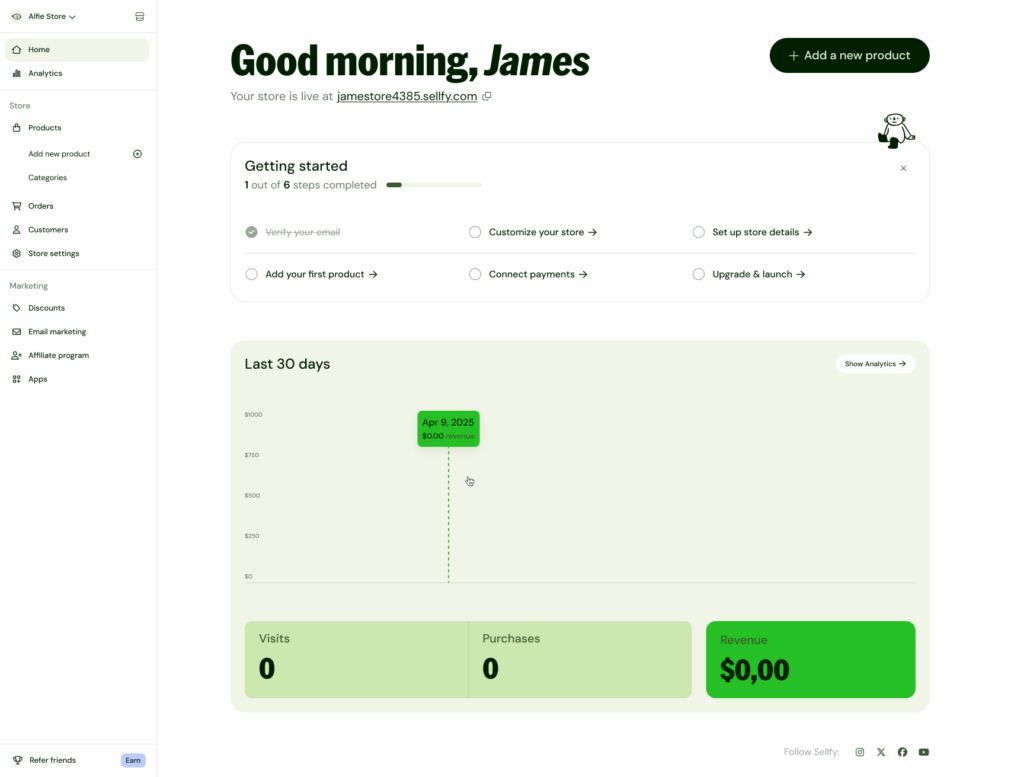
Instead of forcing you to build a full website from scratch, Sellfy gives you a ready-made storefront you can customize. You get a clean, focused store page where customers can browse your products, check out using familiar payment methods, and instantly receive their files or order confirmation.
The core idea is simple: you create, Sellfy handles delivery and payments.
You can sell digital downloads, physical products, subscription-based content, and even print-on-demand merch that you never have to ship yourself. That mix makes Sellfy pretty flexible for creators who like experimenting with different income streams.
Who Is Sellfy Best Suited For?
Well, not everyone needs the same type of store. Sellfy feels especially right for creators who already have or are building an audience somewhere else — YouTube, TikTok, Instagram, Twitter, Twitch, email, whatever — and just need a reliable place to send people when they say “Where can I buy that?”
Picture a few scenarios:
- A video editor on TikTok sells a pack of LUTs and a set of project files. They don’t need a fancy, multi-page site. They just want a clean product page and a way for people to pay and download instantly. Sellfy is a good fit.
- A digital artist wants to offer printable posters, Procreate brushes, and a small run of physical prints. Sellfy lets them keep everything in one store.
- A fitness coach offers a “30-Day Program” as a PDF, plus a monthly membership with extra content. They can handle both a one-time purchase and recurring subscriptions under the same Sellfy account.
Where Sellfy is less ideal is when someone wants a massive, super complex ecommerce setup with lots of custom code, dozens of apps, or deep integrations into a big warehouse or shipping system. It’s more “creator business” than “enterprise ecommerce,” and that’s honestly a good thing for most individuals.
Setting Up Your Store on Sellfy
Actually setting things up is one of the reasons creators gravitate toward Sellfy. The process is straightforward and doesn’t require any technical background.
Once you create an account, Sellfy takes you through a simple onboarding path: name your store, add a product, connect payments, customize design. You don’t need to touch HTML, CSS, or any of that fun-but-annoying stuff.
Adding your first product feels pretty natural. You upload your file — maybe it’s a PDF, a zip file of templates, some MP3 tracks, or a video course — then add a title, description, and cover image. You pick a price, decide whether it’s a one-time purchase or part of a subscription, and hit publish. From there, Sellfy automatically takes care of delivering the product after payment.
If you’ve ever tried to hack all this together using random tools like cloud storage links plus manual emails, the difference is immediate: with Sellfy, the process is automated. Buyers pay → they get a secure download link → you get paid. No “Did you get the file?” messages clogging your DMs.
Storefront Design and Branding
On the design side, Sellfy tries to hit a balance: enough customization so your store looks like you, but not so much that you get overwhelmed by knobs and switches.
You can tweak your store’s layout, upload a logo, change colors to match your brand, and adjust how products are displayed on the page. You might create a big hero banner at the top introducing who you are and what you offer, followed by neat rows of your products. It’s all done through a visual editor, so you’re dragging, toggling, and typing — not writing code.
Is it as endlessly customizable as building a full custom site from scratch? No. But for many creators, that’s a relief. You get a modern, minimal look without having to become a designer. Your store ends up looking clean, focused on the products, and free of clutter.
Types of Products You Can Sell With Sellfy
This is where Sellfy really earns its spot: it’s flexible with product types while still being easy to manage.
Digital Products
Digital products are the heart of Sellfy. You can upload almost any kind of file: ebooks, printables, slide decks, PSD or AI files, Lightroom presets, video files, music, or full course content. You can also attach multiple files to a single product, which is great for bundles.
Imagine a “Creator Starter Pack” that includes a PDF guide, a folder of presets, and a few bonus video tutorials. You upload them all under one product, and Sellfy handles secure delivery. You can even limit the number of download attempts to reduce link sharing.
Physical Products
If you have physical items to ship yourself — prints, zines, custom jewelry, small runs of merch — Sellfy lets you set those up too. You add stock quantity, price, and basic shipping details. Customers check out through the same store, and you handle the packing and shipping manually afterward.
It’s not trying to be a heavy-duty warehouse management system, but it’s enough for solo creators or small teams running light physical product lines.
Subscriptions and Memberships
One powerful feature in Sellfy is recurring payments. You can create subscription-based products, like a membership, ongoing content drops, or access to a resource library.
Say you run a “Monthly Beat Club” where subscribers get new beats every month. You can set a recurring price, manage members inside Sellfy, and update the content you provide over time without forcing people to repurchase.
Print-on-Demand Merch
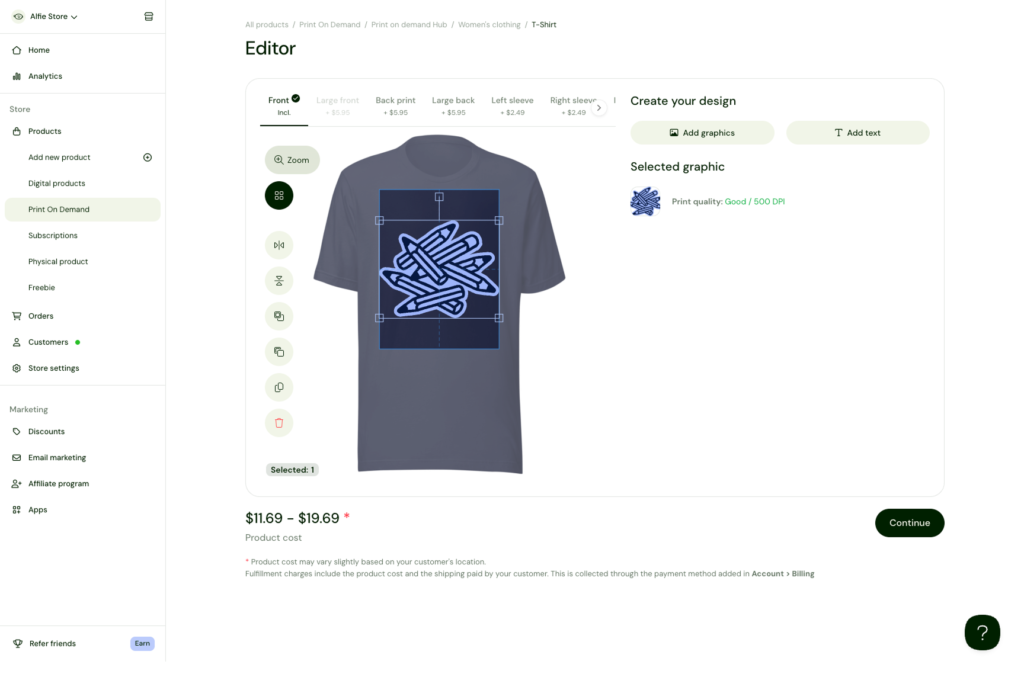
If you like the idea of merch but hate the idea of stuffing envelopes, Sellfy integrates print-on-demand options. You design products such as hoodies, t-shirts, mugs, or bags, and when someone orders, the print partner takes care of printing and shipping.
You don’t have to pre-buy inventory or guess how many sizes you’ll need. For creators who mainly want to test merch ideas, that’s a low-risk way to get started inside the same Sellfy store as your digital products.
Marketing and Sales Tools Inside Sellfy
A store without traffic is just a pretty page, so Sellfy includes some built-in marketing tools to help you sell more effectively.
You can create discounts and coupon codes, run limited-time sales, and set up things like upsells and cart reminders. That means if someone buys one product, you can gently suggest another related item at checkout or afterward. It’s not pushy — just smart.
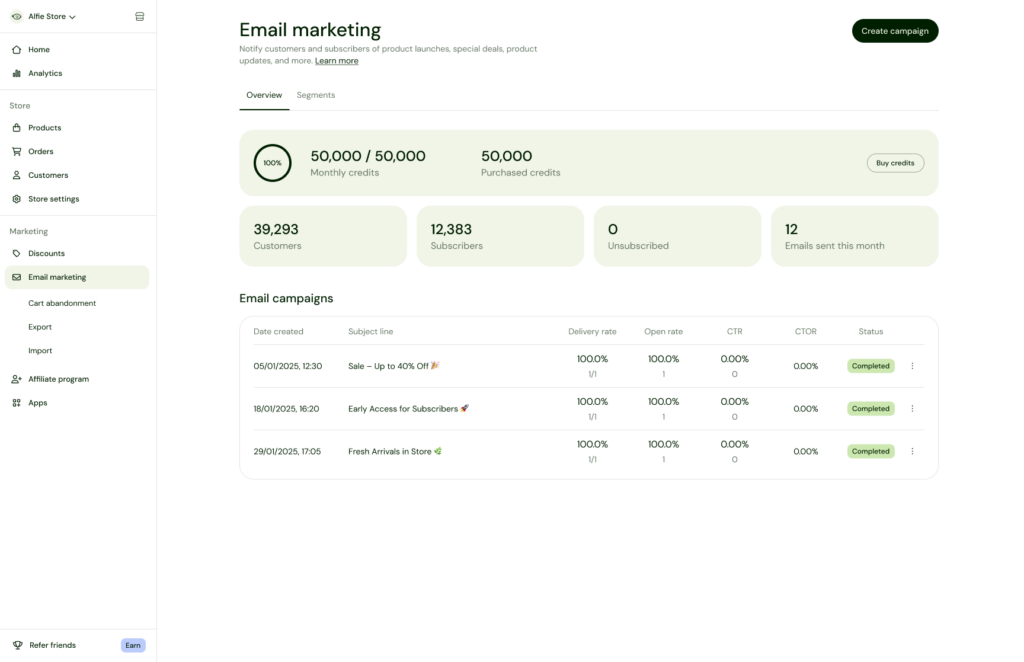
There’s also basic email marketing built into Sellfy. You’re able to send product updates, launches, or announcements to people who bought from you. Instead of exporting your customer list and importing it into another tool, you can stay inside the same platform for simple campaigns.
If you already have your own website, blog, or landing pages, you don’t have to abandon them. Sellfy lets you embed “Buy” buttons or product widgets so customers can purchase without leaving your existing site. That’s handy if you’re slowly transitioning or just want Sellfy to handle the checkout and delivery part.
Payments, Checkout, and Customer Experience
From a buyer’s point of view, checkout on Sellfy is clean and straightforward. Customers pay using well-known payment processors like PayPal or card payments through Stripe (availability can vary by region), and the whole process feels familiar.
Once payment is confirmed, digital buyers receive instant access to their files through secure download links. For physical and print-on-demand orders, they get a confirmation email and then wait for shipping as usual. There’s no messy back-and-forth where you need to send files manually or check if payment went through.
On your end, you can view orders, manage customers, resend download links when needed, and monitor how your products are performing. Sellfy gives you basic analytics so you can see which products are popular and where sales are coming from.
Pricing and the Money Side of Sellfy
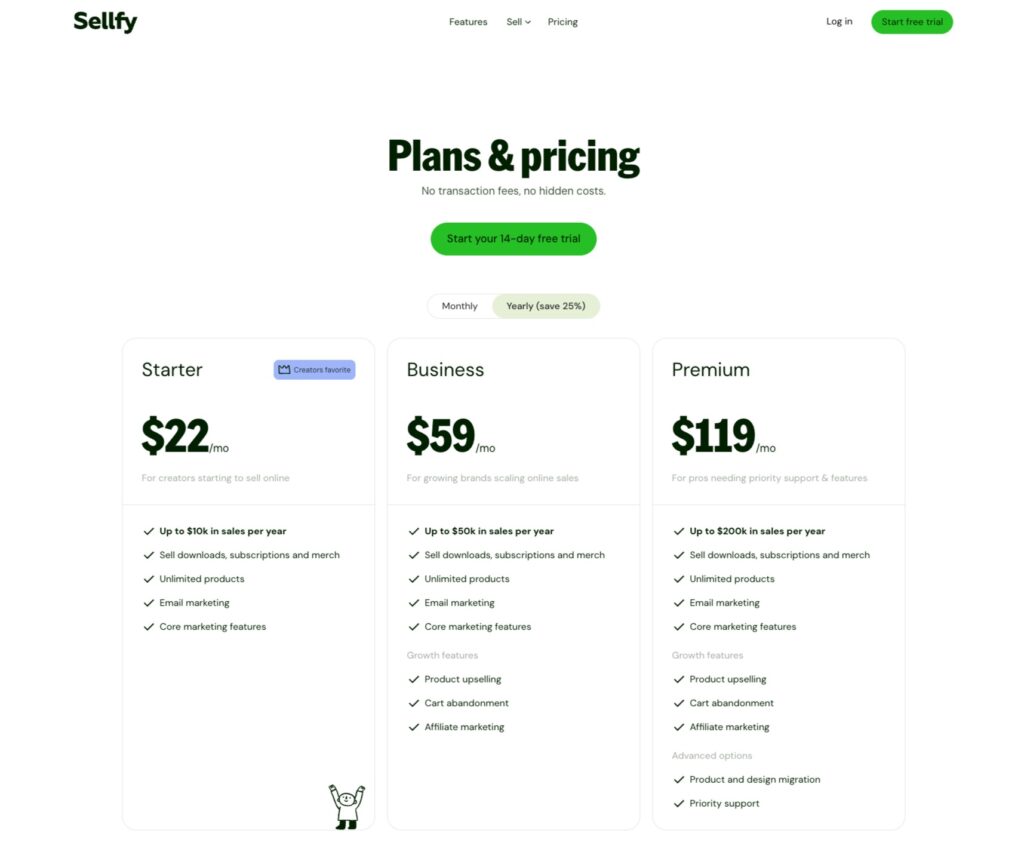
Without turning this into a price table, here’s the general idea: Sellfy works on a subscription model. You pay for a plan, and in exchange, you get access to the platform and its features. Different tiers unlock things like higher sales volume limits, more advanced features, or extra tools.
Payment processing fees (like PayPal or Stripe fees) still apply, because those are separate companies handling the actual transaction. That’s standard across almost every ecommerce platform.
The key question is whether the subscription cost of Sellfy makes sense relative to what you expect to earn. If you’re serious about selling and you have or plan to build an audience, the math often works out, especially when you’re selling digital products with high margins.
For a creator just experimenting with one low-priced product and no real plan to grow, a paid platform might feel heavy. But for someone with a few solid offers — say a $19 template, a $39 preset pack, and a $99 course — one decent launch can easily cover the subscription.
Pros and Cons of Using Sellfy
No platform is perfect, and Sellfy is no exception. Here’s a more natural breakdown of the big upsides and trade-offs.
On the plus side, Sellfy is genuinely easy to use. You don’t feel like you’re learning an entire new profession just to upload a product. The interface is clean, the workflow is logical, and you can have a decent-looking store running quickly. The combination of digital products, physical items, subscriptions, and print-on-demand gives you room to grow different revenue streams without needing multiple platforms.
It also handles the “boring but crucial” stuff like secure file delivery, download limits, and order confirmation. You don’t have to hack together payment links and cloud storage in a way that looks sketchy to buyers.
On the flip side, some users who love total control might find Sellfy a bit limiting. If your dream is a heavily customized site with complex design elements, custom-coded sections, and deep app integrations, you might outgrow it or feel constrained. The built-in marketing features are helpful, but they’re not meant to replace full heavyweight email or funnel tools if you need extremely advanced automation.
Another thing to keep in mind is that Sellfy doesn’t magically bring traffic. It’s your storefront, not your audience engine. You still need to create content, build a following, run ads, or use SEO to send people to the store. Sellfy doesn’t change that reality; it just makes the selling part smoother once someone decides they want to buy.
Real-Life Use Cases: Where Sellfy Fits Perfectly
To make this concrete, here are a few realistic ways creators use Sellfy:
- A photographer sells a bundle of Lightroom presets, plus a mini-guide explaining how to use them. They promote the bundle through before/after examples on Instagram and send everyone to their Sellfy store link in bio.
- A YouTuber who teaches productivity launches a Notion dashboard template. They walk through the template in a video, drop the Sellfy link in the description, and viewers can purchase instantly.
- A music producer offers a monthly subscription where subscribers receive new drum kits and loops every month. Sellfy handles the recurring billing, and the producer just updates the content regularly.
- A small creator brand wants to test merch without buying boxes of stock. They set up print-on-demand products through Sellfy, announce it to their followers, and fulfill orders automatically with no upfront inventory cost.
In each case, the creator doesn’t need to build a complex site or write code. They just set up offers, share the link, and focus on creating content that attracts buyers.
Is Sellfy the Right Choice for You?
So, should you use Sellfy?
It probably makes sense if:
- You’re a creator with digital products (or you plan to create them soon).
- You want a simple, clean store without technical overload.
- You’d like to sell multiple types of offers — digital, physical, merch, or memberships — from one platform.
- You prefer spending your time making content, not wrestling with plugins and code.
It might not be the ideal choice if:
- You need a deeply customized website with advanced design control.
- Your business requires very complex integrations and workflows.
- You’re not planning to sell enough to justify a paid platform.
For many modern creators, though, Sellfy hits a sweet spot: it’s more serious and professional than just throwing a PayPal link in your bio, but far less overwhelming than some giant ecommerce platforms.
If your goal is to turn your audience into customers without turning yourself into a full-time developer, Sellfy is absolutely worth considering as your main storefront.
Read Our another Review: QuickBooks Review 2026: King of Small Business Accounting

