Hippo Video Review
Well, if there’s one thing the digital world doesn’t lack, it’s video tools. Every month, a new platform promises to help you create slick videos that’ll “transform your brand.” But here’s the catch — most of them either overcomplicate things or make you feel like you need a degree in cinematography. That’s where Hippo Video quietly enters the frame.

At first glance, Hippo Video looks like just another screen recorder. But spend a little time exploring it, and you’ll see it’s actually an all-in-one video engagement hub designed for real people — sales teams, marketers, teachers, customer support reps, and anyone who wants to communicate in a more personal way. It’s not trying to replace your camera; it’s trying to replace the static email and cold outreach that no longer work.
A Little Backstory
Imagine trying to explain your product in an email. You spend half an hour crafting the perfect message, another ten minutes editing the tone, and then… radio silence. The recipient never even opens it. That’s the problem Hippo Video set out to solve.
The platform was built around one simple idea: people respond to people, not text blocks. And video — the kind that feels quick, authentic, and personal — is the most natural bridge between brands and their audiences. Hippo Video lets you record yourself or your screen, customize it with branding, and send it straight through email, LinkedIn, or even embed it in your CRM.
Features That Make It Stand Out
Let’s not sugarcoat it — features are what make or break a platform. Hippo Video packs a surprising punch for something that’s so easy to use. Here’s what stands out after using it for a while.
1. Video Creation Made Simple
You don’t need fancy gear or editing skills. You open your browser, hit record, and you’re off. Hippo Video allows you to record your webcam, screen, or both at the same time.
Say you’re a sales rep walking a client through a proposal. You can pull up the slide deck, record your face in a little bubble at the corner, and talk them through the details as if you’re right there in the room.
There’s also a lightweight desktop app for those who prefer offline recording, but honestly, the browser experience is smooth enough for most people.
2. Custom Branding Without the Headache
You can easily customize your video pages — add your logo, choose your brand colors, and even include a call-to-action button. Let’s say you’re sending a follow-up video after a product demo; that CTA could lead straight to your booking page.
Hippo Video doesn’t just stop at slapping your logo on the video. It lets you create personalized thumbnails, video intros, and outros that look professional without needing After Effects or a design team.
3. Seamless Integrations (Because Who Wants Extra Steps?)
One of the most underrated strengths of Hippo Video is how it fits into your existing workflow. It integrates with CRMs like HubSpot and Salesforce, email tools like Gmail and Outlook, and even marketing platforms like Marketo.
So, if you’re in sales, you can send a personalized video right from your CRM dashboard without hopping between tabs. The recipient’s engagement data — who watched it, how long they watched, and where they clicked — gets logged automatically. It’s like having analytics meet storytelling.
4. Analytics That Actually Matter
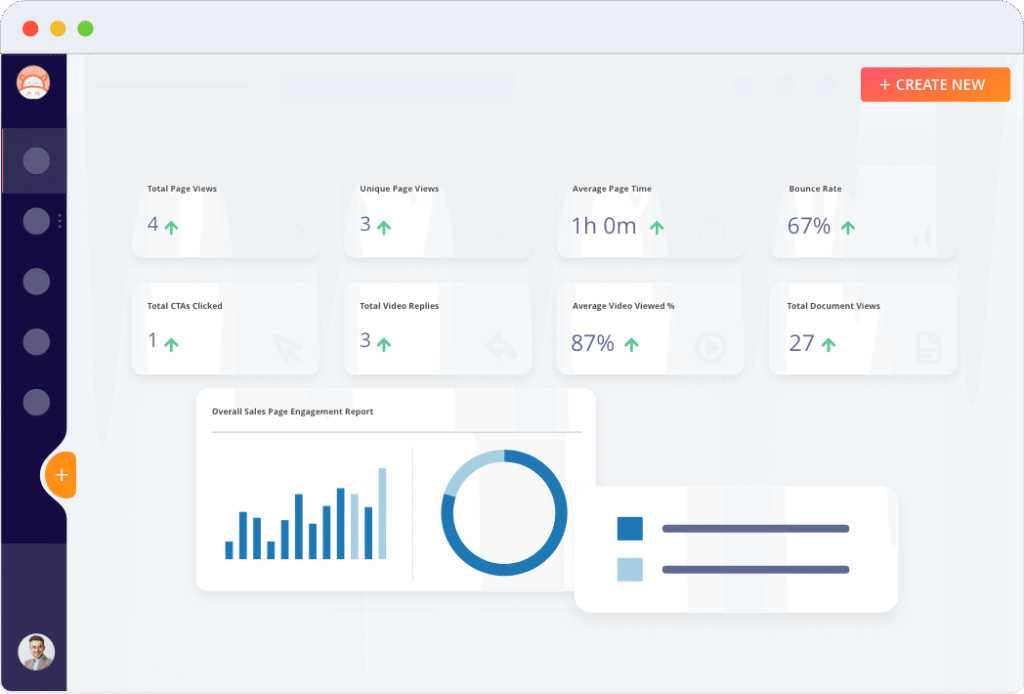
Speaking of analytics, this part deserves more love. You know those vague “insight dashboards” some tools show you? They tell you someone watched your video, but that’s about it.
Hippo Video takes it further. You can see exactly when your viewer dropped off, whether they rewatched certain parts, and what links they interacted with. That kind of detail can change how you approach your next conversation.
For example, if you notice a prospect stops watching right before your pricing slide, maybe you’re leading with too much detail. That’s actionable data — the kind that helps you refine your message in real time.
5. Interactive Elements That Pull Viewers In
This one’s a game-changer. Hippo Video lets you add interactive features to your videos — things like polls, forms, or clickable links. You can even embed a “Book a Meeting” button inside the video itself.
Picture this: a customer watches your explainer video, loves what they see, and clicks “Schedule a Demo” without leaving the player. It shortens the journey from curiosity to conversion in the most natural way possible.
6. Personalization at Scale
One of the biggest challenges with video marketing is scale. Sure, you can record a one-off video for a top client, but what about when you need to reach hundreds?
Hippo Video solves that with its personalized video campaigns. You record a single video and the platform automatically personalizes certain elements for each recipient — name, company, even dynamic thumbnails. It’s like sending a video that says, “Hey, Sarah!” instead of “Hey, valued customer.”
That small human touch can do wonders for engagement rates.
7. A Built-In Video Editing Suite
You don’t have to export your video into another app just to trim out awkward silences or crop frames. Hippo Video comes with a neat built-in editor. You can cut, trim, blur sensitive info, or even add subtitles directly in the browser.
It’s not a replacement for high-end editing tools like Premiere Pro, but it’s perfect for quick turnarounds. Think of it as a smart kitchen knife — not a full-on chef’s set, but sharp enough to get most jobs done beautifully.
8. Video Distribution Made Effortless
Once your video is ready, Hippo Video helps you distribute it anywhere. You can share it via email, social media, or embed it on your website. There’s even an option to create video landing pages.
If you’re in sales, you can attach the video directly to your outreach email. The platform automatically generates an animated GIF thumbnail, which — let’s be honest — is way more inviting than a static link.
Pricing – how much you’ll pay
Okay, here’s the money talk. (Always the fun part.) The pricing details are a bit varied depending on how heavily you’re using it, your seat count, features. I’ll summarize the typical tiers.
- Free Plan: $0 — this gives you basic recording/sharing features, limited usage. Good for testing or very light use.
- Pro Plan: Around $20/month per user (if billed annually) in their “video flows / sales-video” version. G2+1
- Teams Plan: Around $60/month per user when billed annually. (Some sources show $60 or $75 depending on billing)
- Enterprise Plan: ~$80/month per user (minimum seats) for full blown features (unlimited captions/videos, role-based access, dedicated manager) when billed annually.
Bottom line: If you’re a small user or single seat, you can start fairly cheaply. But if you’re a team and you want the full suite of personalization + integrations + branding, you’ll be in the $40-80/user/month ballpark (depending on plan and billing).
Worth noting: They often offer annual billing discounts. Also check what features are included (some features only in higher tiers). For example, custom branding, interactive CTAs, unlimited videos etc may require a higher plan.
Real-World Use Cases
Let’s step out of the features for a minute and talk about how Hippo Video actually fits into daily work life.
For Sales Teams
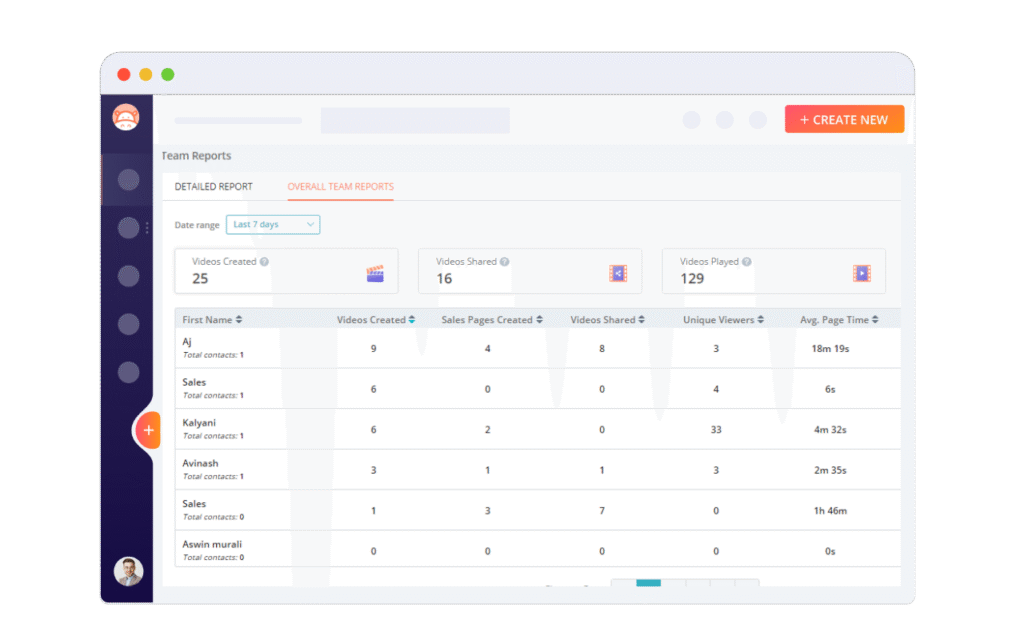
Cold outreach is getting tougher by the day. Emails are ignored, and phone calls go unanswered. But a quick 45-second personalized video? That cuts through the noise.
Sales reps use Hippo Video to record a personal message for prospects — addressing them by name, referencing their company, and walking them through the product. The open and reply rates go through the roof compared to traditional text-only outreach.
For Marketing
Marketers love tools that drive engagement, and Hippo Video gives them exactly that. You can embed videos in landing pages, run personalized campaigns, or even collect user testimonials.
Let’s say you’re launching a new feature. Instead of sending a long email, you send a short video demo. The video opens with your smiling face and ends with a clickable CTA — the human connection is immediate.
For Customer Support
Support teams use Hippo Video to explain fixes visually. Instead of typing long troubleshooting guides, they record quick screen tutorials. Customers appreciate it, agents save time, and confusion drops dramatically.
It’s the difference between reading an IKEA manual and watching someone assemble the furniture right in front of you.
For Educators and Trainers
Remote learning has exploded, and with it came the challenge of keeping students engaged. Hippo Video offers teachers and trainers a way to make lessons more interactive. They can annotate, highlight, and quiz students mid-video. It’s not just about watching — it’s about participating.
The Experience of Using It
Now, let’s talk about the feel of using Hippo Video.
From the moment you log in, the interface feels friendly — colorful without being cluttered. The dashboard guides you step-by-step, and the learning curve is minimal. Even if you’ve never edited a video before, you’ll probably figure it out in under 10 minutes.
Recording is quick. Editing is intuitive. And sharing is almost too easy. There’s a sense of flow to it — no unnecessary pop-ups, no endless setup screens. You just create, personalize, and send.
The Power of Authenticity
Here’s something interesting: videos made with Hippo Video don’t look overly polished — and that’s a good thing. In today’s digital landscape, authenticity wins over perfection. People would rather see a genuine smile than a studio-perfect performance.
One marketing manager I know uses Hippo Video to record product walkthroughs from her desk, complete with a few “ums” and “ahs.” Her videos get more engagement than the brand’s professionally produced ones. Why? Because they feel real.
Collaboration and Workflow
For teams, collaboration is where Hippo Video shines quietly. You can share projects internally, comment, and get approvals in one place. The team workspace keeps everyone aligned — no more digging through endless email threads to find “the latest version” of that video demo.
Plus, you can assign roles and permissions, ensuring only the right people can edit or publish content. It’s structured, yet not restrictive.
The Human Element Behind It
What makes Hippo Video special isn’t just the tech — it’s the mindset behind it. It’s designed for connection, not just communication.
In an era where automation often strips out the human touch, Hippo Video brings it back. It doesn’t replace emails or meetings — it enhances them. It turns a cold message into a conversation, and a faceless brand into a friendly face.
Final Thoughts
Actually, when you step back and look at what Hippo Video offers, it’s more than just a “video tool.” It’s a storytelling platform disguised as a productivity app. Whether you’re trying to close a deal, teach a concept, or explain a product update, it gives you the easiest way to connect through video — without needing Hollywood skills.
It’s approachable, flexible, and surprisingly powerful. But above all, it’s built for the way people actually communicate today — fast, personal, and authentic.
So, the next time you think about sending another long-winded email, pause for a second. Maybe record a short message instead. Because with Hippo Video, that simple change might just make all the difference.
Read Our another Review: Livestorm Review: Best Browser-Based Webinar Software in 2026