
Well, if you’ve been thinking about starting or scaling a credit repair business, you’ve probably bumped into Credit Repair Cloud more than once. It’s one of the most widely talked‑about platforms in this niche, and for good reason: it combines client management, dispute automation, billing, and training under one roof so you can actually run a full-fledged business instead of juggling spreadsheets and templates all day.

In this in‑depth review, you’ll see what Credit Repair Cloud really does, where it shines, where it’s frustrating, and whether the pricing and feature set make sense for you.
What is Credit Repair Cloud, really?
At its core, Credit Repair Cloud is a cloud‑based software platform built specifically to help you run a credit repair business from end to end. Instead of piecing together separate tools for CRM, document storage, dispute letters, billing, and marketing, you get them all in one integrated system.
Think of it as a niche, purpose‑built “all‑in‑one office” for credit repair pros:
- It stores client data and credit reports.
- It generates and tracks dispute letters.
- It lets you bill clients on recurring plans.
- It gives you a portal where clients can log in and see what’s happening.
In practical terms, that means you can bring on a new client, pull in their reports, draft and send disputes, and track progress without hopping between five different apps and losing your mind in the process.
A lot of users also come to Credit Repair Cloud not just for the software, but for the training ecosystem around it—things like the “Credit Hero Challenge” and detailed business trainings that walk you through launching and growing a credit repair business.
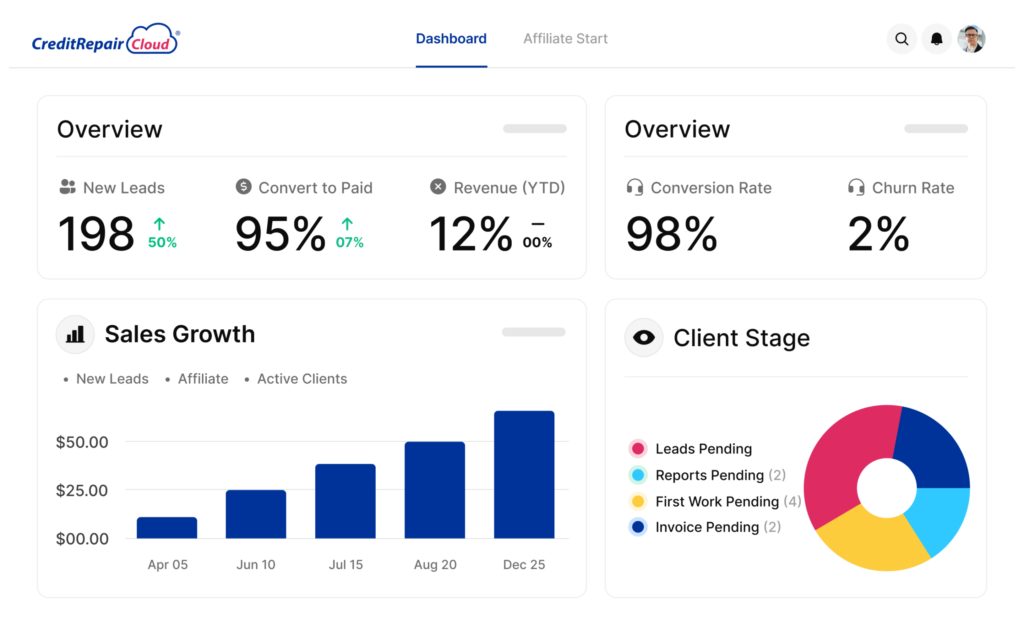
Key features: what you actually get
Rather than just listing features, let’s walk through how they show up in a real workflow. Imagine you sign a new client today. What would you do inside Credit Repair Cloud?
1. Client management and CRM
The first thing you notice is the CRM side of Credit Repair Cloud. You create a client profile, store their contact details, track their enrollment status, and see every note, task, and dispute associated with that client in one timeline.
You can:
- Assign tasks to team members.
- Track lead sources and sales stages.
- Keep documents (IDs, agreements, proof, etc.) attached to each client record for compliance and convenience.
For anyone coming from a basic spreadsheet setup, this feels like the difference between a junk drawer and a labeled filing cabinet.
2. Credit report import and analysis
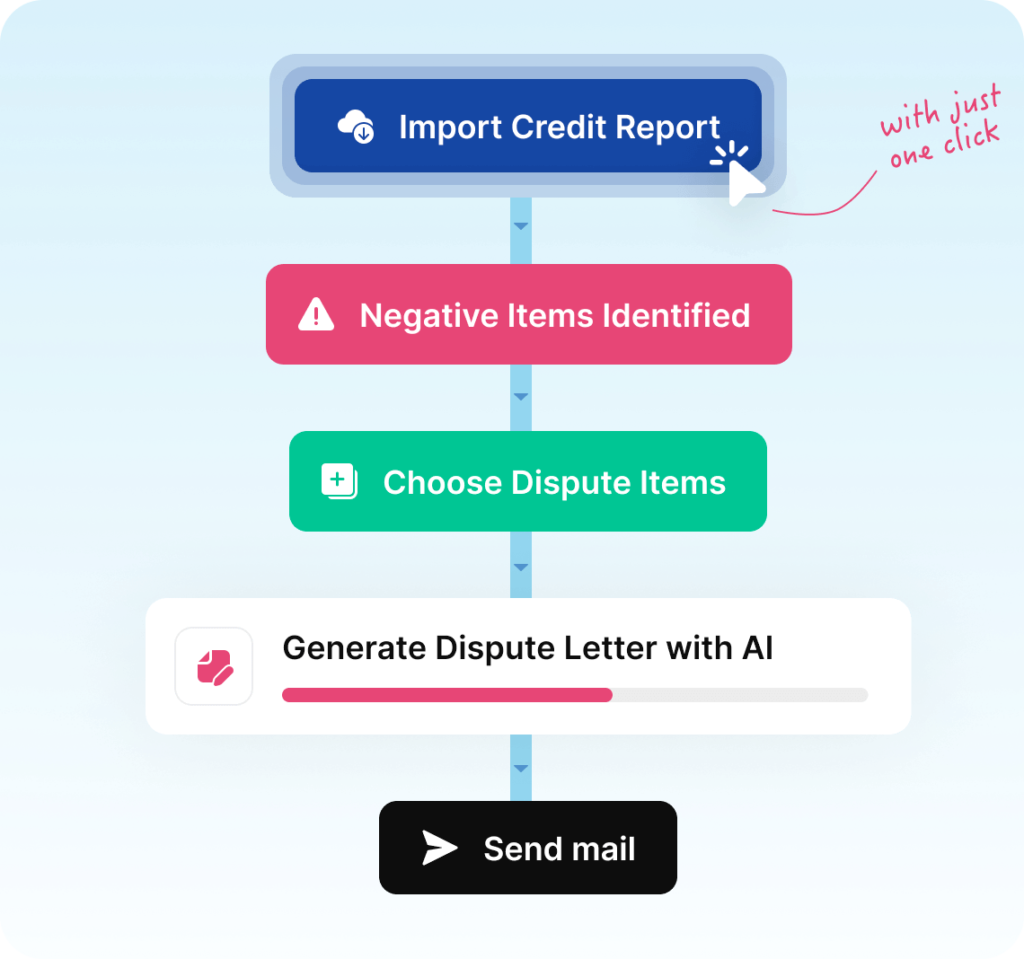
Once the client is set up, you move on to their actual credit data. Credit Repair Cloud lets you securely store credit reports and scores, then gives you tools to analyze those reports for negative items.
You can:
- Import online credit reports instead of manually typing every tradeline.
- Quickly flag late payments, collections, charge‑offs, and other derogatory items.
- Track changes to these items over time so you can show measurable progress to your clients.
In practice, this is where the time savings really start to show. Instead of manually combing through PDFs, you’re working inside a system designed to highlight what needs attention.
3. Dispute letter automation
This is arguably the “headline” feature: Credit Repair Cloud includes a library of dispute letter templates and automates much of the creation and tracking process.
Realistically, that means you can:
- Select which items to dispute for a client.
- Generate letters with names, account details, and dispute reasons merged in automatically.
- Print or export those letters for mailing, and track when you sent them and to whom.
Over multiple rounds of disputes, the system helps you stay organized—what was disputed, when, and what response came back—so you don’t accidentally send the wrong follow‑up or miss a deadline.
4. Compliance and documentation
Compliance is a major headache in this industry, and Credit Repair Cloud tries to make it less painful.
You can:
- Store signed agreements and disclosures in client profiles.
- Track dispute timelines and responses for documentation.
- Keep organized records that help you stay aligned with credit repair laws and regulatory expectations.
Is it a magic “you’re 100% compliant forever” button? No. But it gives you structure and documentation tools that make compliance far easier than trying to wing it with ad‑hoc systems.
5. Billing, invoicing, and subscriptions
Next comes the money side. Credit Repair Cloud includes integrated billing, so you don’t need a separate tool just to charge clients.
Inside the platform you can:
- Set up recurring subscription plans (for example, monthly fees).
- Charge one‑time setup or audit fees.
- Automate invoice sending and overdue payment reminders.
- Track who’s paid, who’s late, and who’s canceled.
If you’ve ever manually chased payments or tried to reconcile a mess of PayPal subscriptions with your client list, having this baked into the same system as your disputes and client records is a huge relief.
6. Client portal and white‑label options
Clients hate being left in the dark. Credit Repair Cloud offers a white‑labeled client portal where your customers can log in, see their progress, and communicate with you.
You can:
- Brand the portal with your logo and business name.
- Let clients view updates, uploaded documents, and sometimes even score progress.
- Reduce “What’s going on with my case?” messages because clients can check for themselves.
This is also a subtle marketing asset—professional portals build trust and make your operation feel more like an established firm than a side hustle.
7. Sales, marketing, and affiliates
While not a full‑blown marketing automation suite, Credit Repair Cloud does include tools to help you bring in and manage more business.
You can:
- Track leads and where they came from (ads, referrals, partners).
- Run email or SMS campaigns to nurture prospects and update current clients.
- Manage affiliates, which is helpful if you partner with mortgage brokers, car dealerships, or other professionals who send you clients.
In other words, it’s not just about fixing credit—it’s about building a repeatable pipeline so you’re not stuck wondering where next month’s clients will come from.
Credit Repair Cloud8. Training and “business in a box” feel
A big part of the appeal of Credit Repair Cloud is the training ecosystem: things like the Credit Hero Challenge and on‑platform education for building your business.
This training helps you:
- Learn the basics of credit repair and disputing.
- Understand how to package and price your services.
- Put systems in place (scripts, workflows, templates) that make your business more predictable.[finmasters]
For a complete beginner who doesn’t just need software but also guidance, this can feel like having a mentor built right into the platform.
Pricing: how much does Credit Repair Cloud cost?

Pricing can vary over time and by region, but overall, Credit Repair Cloud uses a monthly subscription model with several tiers based mainly on team size and number of active clients.
Different reviews and breakdowns highlight slightly different naming and price points, but the common pattern looks something like this:
- An entry‑level plan around the lower‑to‑mid hundreds per month, aimed at smaller operations (often with a few team members and a cap around a few hundred active clients).
- Mid‑tier plans at a higher monthly cost, increasing the number of team members and active clients you can manage and unlocking more advanced features.
- Higher or enterprise‑level plans that support larger teams, higher client volumes, and additional capabilities or priority support, at significantly higher monthly fees.
Some sources also reference “starter” or “basic” style plans at lower price points and more robust “professional” or “enterprise” plans with expanded storage, branding, and integrations.
Beyond the software subscription itself, there are a few cost angles to keep in mind:
- Training programs: Many of the more intensive trainings, challenges, and add‑on services are sold separately, so your real spend can go beyond the base subscription.
- Payment processing and third‑party tools: You may still use external services for monitoring, hosting, or merchant accounts, which carry their own costs.
Is it cheap? No. Most reviewers agree that Credit Repair Cloud sits on the higher end of the pricing spectrum for this type of software, but they also note that the breadth of features and training can justify the cost if you actually use it to build a serious business rather than treating it like a hobby expense.
Who is Credit Repair Cloud best for?
Actually, this is one of the most important questions to ask before you even look at the features.
Credit Repair Cloud is usually a good fit if:
- You want to run a real credit repair business, not just fix your own credit one time.
- You’re serving multiple clients and need structure, automation, and documentation.
- You want a platform that includes both tools and training so you’re not guessing what to do next.
Typical users include:
- Solo credit repair entrepreneurs who want to appear professional from day one.
- Small teams that need shared access to client data, tasks, and disputes.
- Mortgage or real estate professionals who add credit repair as a side service and want to manage referrals efficiently.
On the other side, Credit Repair Cloud might not be ideal if you:
- Only want to improve your own personal credit and don’t plan to sell services.
- Are extremely price‑sensitive and not ready to invest a few hundred dollars per month in software.
- Prefer to build your own tech stack from separate, cheaper tools and handle more manual work yourself.
Pros of using Credit Repair Cloud
Let’s dig into the upsides that come up most often in expert analyses and user reviews.
1. All‑in‑one workflow
The biggest advantage is that Credit Repair Cloud is designed as a full business backbone: CRM, disputes, billing, portal, and training are integrated. That dramatically reduces the tech chaos that many small operators deal with when using multiple disconnected tools.
Instead of duct‑taping together spreadsheets, Google Docs, generic CRMs, and invoice apps, you can set up standardized processes and let the system carry most of the load.
2. Strong automation
Dispute letter generation, reminders, billing cycles, and parts of your communication can be automated or at least heavily streamlined in Credit Repair Cloud.
This matters because:
- You save hours each week on repetitive tasks.
- You lower the risk of human error (wrong letter, wrong address, missed follow‑up).
- You become able to handle more clients without burning out.
In short, automation is what lets you scale from a dozen clients to hundreds while still maintaining quality.
3. Training and support ecosystem
Another major plus is the emphasis on education. Reviews consistently highlight that Credit Repair Cloud doesn’t just drop you into a blank dashboard and wish you luck.
You get:
- Educational programs like the Credit Hero Challenge to help you launch quickly.
- Resources on both the technical (credit laws, disputes) and business (pricing, sales) side.
- Community and support channels where you can learn from others in the same field.
For someone without a background in credit repair or entrepreneurship, this is a big confidence booster.
4. Purpose‑built for compliance‑heavy work
Because the platform is tailored to the credit repair industry, many of its features are constructed with regulatory realities in mind.
Document storage, agreement tracking, dispute timelines, and detailed logs all support a more compliant operation, especially compared to generic tools where you’d have to build this structure yourself.
5. Client experience and perceived professionalism
The portal, branding options, organized communications, and regular reporting possible with Credit Repair Cloud help you look like a polished, established firm.
Clients see an organized process, not random emails and scattered PDFs, which builds trust and makes referrals more likely.
Cons and potential deal‑breakers
No platform is perfect, and Credit Repair Cloud is no exception. Here are the main drawbacks that show up across expert reviews and user feedback.
1. Higher price point
One of the most consistent criticisms is that Credit Repair Cloud is relatively expensive compared to some other tools or DIY setups.
If you’re just starting out with no clients yet, paying a few hundred dollars a month can feel intimidating, especially before your revenue is consistent. For some, the price alone is enough to push them toward either cheaper software or a more manual setup.
2. Limits on lower‑tier plans
Lower‑tier plans can come with caps on the number of team members and active client files you can manage.
That means:
- As you grow, you may need to upgrade to a more expensive tier sooner than expected.
- You have to keep an eye on your “active client” count to avoid hitting limits at the wrong time.
For fast‑growing businesses, this is just the cost of scaling. For slower operations, it can feel like paying for unused headroom.
3. Learning curve and complexity
Although the software is designed to be user‑friendly, there is still a learning curve—especially if you’re new to both credit repair and business software in general.
You’re not just learning how to click around a dashboard; you’re learning:
- Credit repair processes.
- Compliance basics.
- How to structure your services and workflows.
The training helps, but you should expect a ramp‑up period before everything feels smooth.
4. Add‑on costs and upsells
Some reviewers note that certain advanced trainings, services, or connected tools cost extra and that Credit Repair Cloud can feel pushy with marketing and upsells at times.
If you’re disciplined and clear on what you need, this may not bother you. But if you’re prone to buying every shiny upgrade, your total monthly spend could creep up quickly.
Real‑world scenario: what a month might look like
To make all of this more concrete, imagine a small credit repair business owner—let’s call her Sarah—using Credit Repair Cloud.
In a typical month, she might:
- Receive new leads from a mortgage broker partner; they automatically drop into Credit Repair Cloud as prospects.
- Convert some of them to paying clients, send agreements for e‑signature, and set up recurring billing inside the platform.
- Import their credit reports, identify disputes, and generate letters in batches, tracking which bureaus and creditors each one goes to.
- Use task management to assign follow‑ups to a part‑time assistant, who logs into the same system to work.
- Let clients check their portal for updates rather than emailing her constantly.
- Run basic email sequences to follow up with leads who didn’t sign up on the first call.
By the end of the month, she can see:
- How many clients signed up.
- How many disputes were sent and what responses came back.
- How much revenue was collected through subscriptions and one‑time fees.
Could she do all of this with a patchwork of tools? Probably. But the value of Credit Repair Cloud is that it turns that patchwork into a single system.
Is Credit Repair Cloud worth it?
So, is this software actually worth the investment? The honest answer: it depends on your intentions and discipline.
Credit Repair Cloud is most likely worth it if:
- You’re committed to building a real credit repair business with multiple paying clients.
- You want the structure of an all‑in‑one platform and are willing to pay for the convenience and automation.
- You’ll take advantage of the trainings, templates, and automation tools rather than just letting them sit unused.
It may not be worth it if:
- You only need to fix your own credit and don’t plan to take on clients.
- Your budget is extremely tight and you aren’t ready to invest in business infrastructure.
- You prefer fully customized, self‑built workflows, even if they’re more time‑consuming.
In many reviews, professionals acknowledge that the subscription fee is substantial but argue that a handful of paying clients can cover the cost of Credit Repair Cloud each month. After that, the rest is profit—assuming you’re marketing consistently and delivering results.
If you share a bit about your situation—whether you’re starting from zero, already have clients, or are adding credit repair to an existing business—content can be tailored around how Credit Repair Cloud fits that specific scenario and what angle to emphasize on your website.
Read Our another Best CRM Tool Review: Keap Review 2026: Features, Pricing & Pros vs Cons Explained

