
If you’ve spent any time hunting for affordable GPU power, you’ve probably bumped into Runpod. It shows up in conversations about AI image generation, model fine-tuning, LLM deployment, ComfyUI workflows, and just about any project that becomes painfully slow the moment your laptop has to do the heavy lifting. And honestly, that’s exactly why people notice it. It promises something many developers, creators, and small teams want but rarely get from traditional cloud providers: GPU infrastructure that doesn’t feel bloated, intimidating, or absurdly expensive.
That’s the short version. The longer version is a little more interesting.
Runpod is positioned as an AI infrastructure platform that lets users launch GPU-enabled environments quickly, deploy serverless workloads, scale from idle to large traffic bursts, and avoid some of the usual friction that comes with cloud setup. According to its site, developers use it to train models, process data, run image and video workflows, and deploy production inference systems, all while choosing from more than 30 GPU SKUs across 30+ regions.
So, is Runpod actually good? In many cases, yes. It can be a very practical option for creators, indie hackers, AI startups, and even larger teams that need access to GPUs without building their whole business around infrastructure headaches. But like any platform, it shines in some areas and feels less ideal in others. Pricing can be excellent for the right workload, yet not every setup is equally economical. The feature set is broad, but beginners may still need a little patience during their first deployment.
This review walks through what Runpod does well, where it stumbles a bit, how its pricing works, and who will get the most value from it.
What Runpod actually is
At its core, Runpod is a GPU cloud platform built for AI workloads. That means instead of buying a costly workstation, maintaining your own server, or renting oversized infrastructure from one of the giant cloud vendors, you can spin up a GPU environment in under a minute and start working from there.
Think of it like renting a high-performance kitchen instead of building a restaurant from scratch. If all you need is access to serious equipment for a few hours, it makes far more sense to pay for usage rather than invest in the entire building, staff, utilities, and maintenance. That’s roughly the appeal of Runpod for AI developers and creators.
The platform revolves around a few major pieces. One is GPU Pods, which are essentially GPU-enabled environments for development, training, rendering, experimentation, and hands-on workloads. Another is Serverless, which is aimed at production inference and scaling, with features like autoscaling, active workers, and FlashBoot cold starts listed at under 200 milliseconds on the site. It also offers storage options, public endpoints for pre-deployed models, and cluster products for users who need multi-GPU setups.
That makes Runpod more than a simple “rent a GPU” marketplace. It’s trying to be a full-stack AI compute environment where somebody can go from experiment to deployment without changing platforms halfway through.
Features that stand out
One reason Runpod gets attention is that it tries to reduce the usual cloud friction. The company says you can launch a GPU pod in seconds, deploy globally across 8+ regions, and scale serverless workers from 0 to 1000s in seconds depending on demand. For anyone who has ever spent half a day wrestling with infrastructure before even testing a model, that promise is a pretty compelling one.
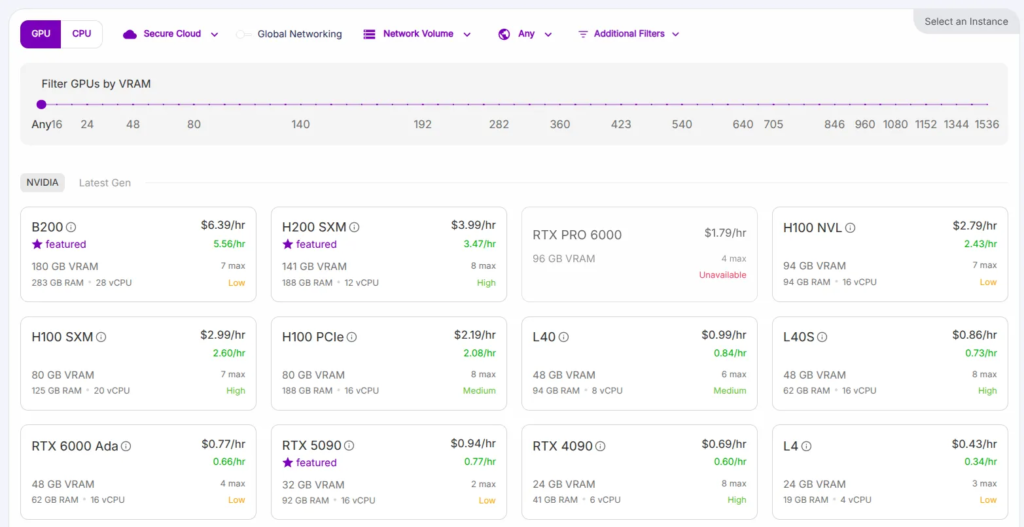
The GPU selection is another strong point. Runpod says it supports over 30 GPU SKUs, ranging from cards like the RTX 4090 up to high-end options such as A100, H100, H200, and B200-class offerings shown across its product pages. In plain English, that means users can choose cheaper hardware for light experimentation or move to heavyweight cards for larger inference and training jobs.
Actually, this flexibility matters more than many reviews admit. A hobbyist generating images in ComfyUI doesn’t need the same setup as a startup serving a language model around the clock. On Runpod, those two users can stay inside the same ecosystem while picking very different compute options.
Serverless is one of the platform’s more business-friendly features. The site describes autoscaling, always-on active workers, and managed orchestration that handles queues and task distribution, which can save engineering time for teams turning prototypes into products. That is a big deal because building your own orchestration layer is rarely the glamorous part of an AI business. It’s necessary, sure, but most teams would rather spend time on the model, the app, and the customer experience.
Storage is also worth mentioning. Runpod advertises persistent network storage, S3-compatible storage, and no ingress or egress fees on its storage offering, which can be attractive for data-heavy workflows. If you’ve ever moved large model files around and watched costs quietly creep up in the background, you’ll know why this is more than a footnote.
Then there’s enterprise readiness. The homepage highlights 99.9% uptime, SOC 2 Type II compliance, and the ability to scale to thousands of GPUs. Not every user will care about compliance on day one, but for companies handling sensitive workloads or preparing for bigger contracts, those details matter.
User experience in real life
So what does using Runpod feel like?
For many people, it feels refreshingly direct. You choose a GPU, launch an environment, connect your tools, and start running workloads without needing to architect a whole mini-data-center first. That simplicity is part of the platform’s charm.
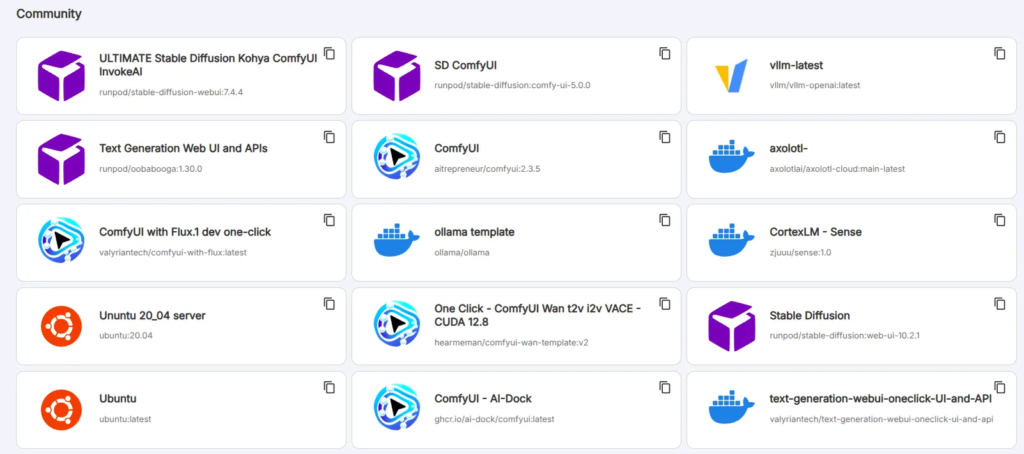
A practical example helps here. Imagine a designer who wants to run Stable Diffusion with ComfyUI for client work. Their local machine might be decent, but after a few complex workflows, upscalers, LoRAs, and big queues, everything slows to a crawl. With Runpod, they can rent stronger GPU capacity only when needed, finish the project faster, and avoid the upfront cost of buying a premium desktop GPU.
Now picture a small AI startup building an app with fluctuating demand. On quiet days, they don’t want to pay for a bunch of idle GPU instances. On launch day, though, they need infrastructure that can absorb a sudden traffic spike. The serverless side of Runpod is clearly designed for that kind of scenario, with scaling from zero and worker options tailored to bursty or always-on workloads.reddit+1
That said, no platform is magic. Even if the infrastructure layer is simplified, users still need to understand their own workload, memory requirements, storage use, and cost patterns. If someone chooses an oversized GPU, leaves resources idle, or stores data inefficiently, the platform won’t save them from poor planning.
So yes, Runpod can feel easy compared with older-school cloud setups. But “easy” here means easier infrastructure, not zero learning curve.
Runpod pricing explained
Pricing is one of the main reasons people look at Runpod in the first place, and the platform offers several pricing layers depending on how you plan to use it.
For Serverless GPU workloads, the pricing page lists both Flex and Active workers. Flex workers scale up during spikes and return to idle after jobs complete, making them more cost-efficient for unpredictable demand, while Active workers stay on continuously to reduce cold starts and come with discounts of up to 30% according to the pricing page.
The listed serverless rates vary by GPU. On the lower end, the page shows options like A4000, A4500, RTX 4000, and RTX 2000 at 0.58 per second for Flex and 0.40 per second for Active, while a 4090 PRO is listed at 1.10 per second Flex and 0.77 per second Active. Higher-tier GPUs climb from there, with the A100 shown at 2.72 Flex and 2.17 Active, the H100 PRO at 4.18 Flex and 3.35 Active, the H200 at 5.58 Flex and 4.46 Active, and the B200 at 8.64 Flex and 6.84 Active.
For instant clusters, Runpod lists hourly examples such as A100 SXM at $1.79 per hour and H200 SXM at $4.31 per hour, with some other cluster pricing marked as contact sales. Reserved clusters are aimed more at enterprise users and are quote-based rather than openly itemized.
Storage pricing is fairly straightforward by cloud standards. The site lists container disk at $0.10 per GB per month, volume disk at $0.10 per GB per month while running and $0.20 per GB per month while idle, standard network storage at $0.07 per GB under 1TB and $0.05 per GB over 1TB, and high-performance network storage at $0.14 per GB per month.
There are also public endpoint prices for ready-to-use model APIs. Those include image, language, audio, and video models billed per request, per character, per second, or per token depending on the model. So if someone doesn’t want to manage infrastructure at all, Runpod has another path besides launching pods directly.
Is it cheap? Well, often yes, especially compared with the overhead and complexity people associate with major hyperscale providers. But “cheap” depends on behavior. A carefully chosen GPU used for exactly the time you need can be excellent value. A powerful instance left running all night because you forgot to shut it down? That’s a different story entirely.
Pros and cons
The biggest advantage of Runpod is value for money across a wide range of AI workloads. It combines broad GPU selection, fast deployment, serverless scaling, storage options, and a workflow that tries to keep experimentation and production inside one ecosystem.
Another plus is versatility. One person might use Runpod to launch a temporary 4090 environment for image generation, while another builds an inference backend with autoscaling workers and global deployment. The same platform can serve both, and that flexibility is not trivial.runpod+1
It also deserves credit for speaking to real AI users rather than generic cloud customers. The site leans into training, inference, image workflows, deployment, and developer speed, which makes the product feel purpose-built instead of awkwardly retrofitted for AI.
Still, there are drawbacks. Pricing can become confusing if you mix pods, serverless workers, storage, and endpoints without a clear plan, especially for beginners reading cloud billing screens for the first time. Some higher-end options also move into quote-based territory, which is normal for enterprise infrastructure but less transparent than many solo users prefer.
There’s also the broader reality that GPU availability, hardware choice, and ideal configuration depend on workload. A newcomer may need some trial and error before finding the sweet spot between speed, VRAM, and cost. In other words, Runpod reduces infrastructure friction, but it does not replace judgment.
Who should use Runpod
Runpod makes the most sense for creators, developers, researchers, and startups that need GPU access without committing to expensive owned hardware or cumbersome cloud architecture. It is especially appealing for image generation pipelines, LLM inference, experimentation, bursty product traffic, and teams that want to move quickly.
If you’re a solo builder running ComfyUI, training small models, or testing ideas before investing heavily, Runpod is easy to understand as a practical tool: pay for compute when you need it, stop paying when you don’t. If you’re a startup trying to scale from prototype to production, the serverless and cluster offerings make the platform more serious than a hobby-only option.
Who might not love it quite as much? Large enterprises with extremely rigid procurement, compliance, or custom architecture needs may end up comparing it against negotiated contracts elsewhere. And absolute beginners who expect “click one button, understand everything instantly” may need a bit of time before the pricing model and deployment choices fully click.
Even so, Runpod earns its reputation as a modern GPU cloud worth considering. It is fast-moving, AI-focused, and built around a simple but powerful idea: most people want the GPU, not the infrastructure drama. If that sounds familiar, it’s not hard to see why Runpod keeps coming up in AI circles.
Read Our another Best Tool Review: Reply.io Review – AI Sales Outreach & Cold Email Platform

