
Salesflare Review
If you’ve ever tried to manage leads, conversations, and follow-ups manually, you already know the pain points: forgotten calls, scattered notes, spreadsheets with more chaos than structure, and that nagging fear that one promising lead has slipped through the cracks. I’ve been there, and honestly, it’s usually the moment when you start searching for “a CRM that doesn’t make my life harder.”
That’s exactly where Salesflare tends to creep into conversations. It’s not just another CRM competing for attention in a crowded marketplace—its approach feels different. Lighter. More human. Less like an enterprise tank and more like a nimble companion that quietly keeps your sales world from falling apart.
When I first experimented with Salesflare, I didn’t expect much. CRMs often promise the moon. But after a few days of using it like a normal human (not someone trying to test every corner of a UI), something interesting happened: I realized I was spending hardly any time “maintaining” the CRM. It was—strangely—maintaining itself. And that’s precisely where its magic begins.
Let’s walk through what it feels like to use Salesflare in the real world, how its features show up in your workflow, and why so many small teams swear by it.
A CRM That Feels Like It Actually Understands Salespeople
The first thing you notice about Salesflare is that it doesn’t assume you want to spend your day filling out forms. Actually, most people who sell for a living hate data entry with a passion. They want conversations, not checkboxes. And Salesflare seems to be built by people who genuinely get that.
The moment you connect your email, calendar, or social accounts, things start happening automatically. It pulls in contacts, logs your emails, tracks your follow-ups, and builds timelines that feel like they’ve been curated by a meticulous assistant you never hired.
Picture this: you meet someone at a conference, exchange a couple of emails, and set a meeting. Traditional CRMs would require you to manually add their name, company, email address, maybe even their LinkedIn URL. But Salesflare quietly scoops all that info from your email signatures, enriches it with publicly available company data, and lays it neatly in your pipeline. You don’t even realize it’s happening until you open the app and think, “Oh wow, it’s already here.”
It’s a subtle difference, but the kind that adds up over weeks and months. You feel less like you’re working for the CRM and more like the CRM is working for you.

Automation That Doesn’t Feel Artificial or Pushy
Automation is one of the trickiest things for CRM systems to get right. Too many tools offer automations that either nag you relentlessly or make you feel like you’re babysitting a robot. But Salesflare leans into a more natural rhythm.
Instead of complicated workflow builders that resemble flowcharts from a NASA operation, it gives you small, smart nudges. Did someone fail to reply after three days? It’ll softly remind you. Have you forgotten to qualify a lead that’s been sitting idle? It’ll tap your shoulder like a colleague saying, “Hey, didn’t you need to check on this one?”
One of my favorite examples is the way Salesflare tracks email opens and website visits. Not in a creepy, overbearing way—but in a way that helps you intuitively understand when a prospect is warming up. Imagine sending a proposal and later seeing the prospect open it three times within an hour. That’s not just data; that’s a signal. And Salesflare gives you those signals without drowning you in dashboards.

It’s like having a silent observer that whispers, “Now might be a good time to follow up.”
A Visual Pipeline That Feels as Clear as a Whiteboard
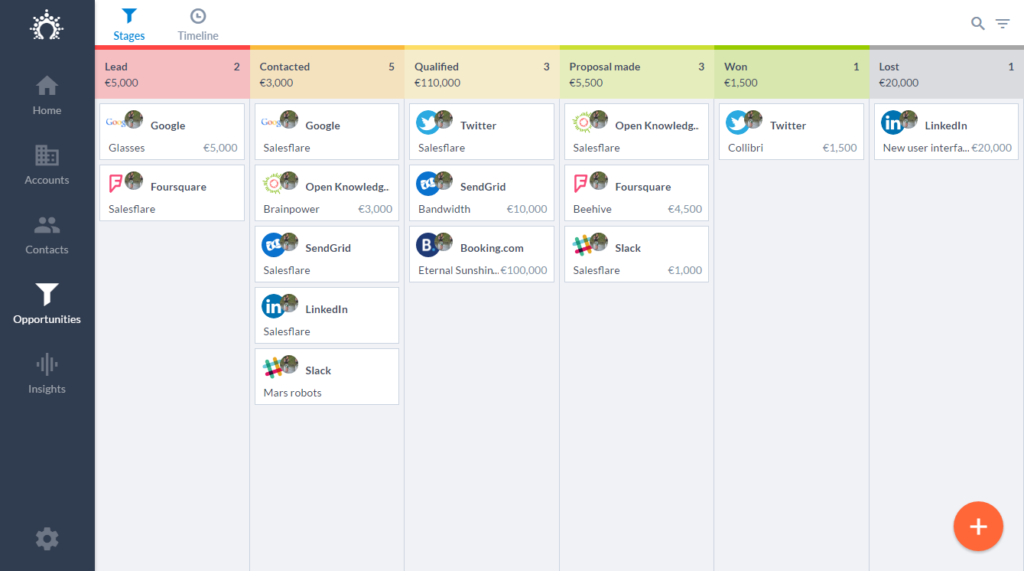
Every CRM has a pipeline view, but not all of them succeed in making you feel grounded in your sales process. Some feel cluttered; others feel flat or too corporate. The pipeline in Salesflare is closer to a clean kanban board you’d draw during a team meeting.
Dragging deals from one stage to another feels natural. But what’s more impressive is how much context each deal contains—without you needing to add it manually.
A deal card may show:
- recent conversations
- next task
- last interaction date
- contact activity
- internal notes
All of this appears automatically because the platform already ties your calendar, inbox, and contact history together. You don’t have to dig through folders or message threads to recall what happened last Tuesday. It’s there waiting for you.
And there’s something almost therapeutic about seeing a cluttered spreadsheet turn into a visually intuitive flow of stages that reflect your real business process. Salesflare doesn’t impose a structure; it adapts to yours.
Email Tracking That Actually Helps You Sell Smarter
Email tracking can sometimes feel like a gimmick, but with Salesflare, it becomes a source of genuine insight. When someone opens your email, downloads your attachment, or clicks a link, you can see it in real time.
Let me give you a real scenario:
You send a proposal on Monday. It gets no response. You assume the lead went cold. But on Wednesday, you notice the proposal was opened twice in the morning. Instead of giving up, you send a friendly nudge: “Hey, just checking in—let me know if you have any questions.” They reply within minutes.
Without that visibility, you’d probably have let the conversation drift away.
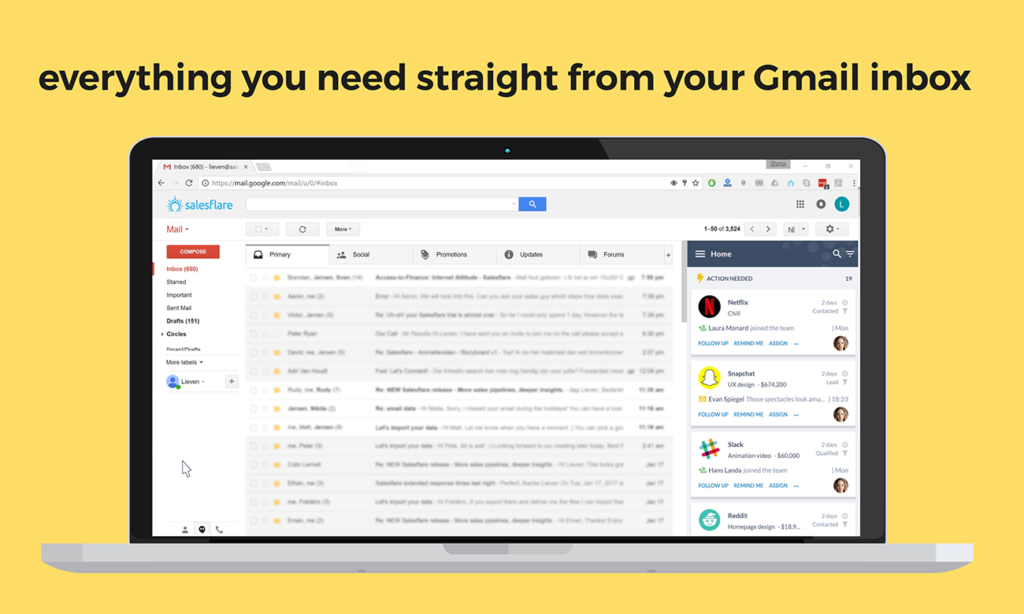
Salesflare helps you time your communication with intuition backed by real data, not guesswork.
A CRM That Scales With Humans, Not Corporations
Some CRMs are clearly built for giant enterprises with layers of managers and committees. Salesflare feels closer to a CRM built for scrappy teams, solo founders, small agencies, and growing businesses where relationships actually matter.
If you’re a team of five, everyone can immediately get up to speed. There’s no steep learning curve, no two-hour onboarding videos, no labyrinth of settings. It’s the kind of tool you introduce to a new team member and they say, “Oh, this makes sense,” within minutes.
But here’s the interesting part: even though it feels simple, it’s not simplistic. Under the hood, Salesflare has deep functionality—custom fields, bulk actions, funnel analytics, account-based views, and intelligent segmentation. It just hides the complexity until you need it, which is exactly how modern software should behave.
The Mobile Experience That Doesn’t Feel Like an Afterthought
Most CRMs have mobile apps, but many of them feel like shrunken-down versions of the desktop interface—functional but awkward. That’s not the case with Salesflare. The mobile app feels carefully designed, almost like the creators knew that field sales reps and founders don’t live at their desks.
You can pick up a call, log a meeting, scan a business card, update a pipeline, or check your notes while walking into a client’s office. It doesn’t lag, it doesn’t overwhelm, and it doesn’t force you to do acrobatics with your thumbs. It simply works.
I once updated an entire day’s worth of follow-ups while riding in the back of an Uber. That probably wouldn’t have been possible with most CRMs I’ve used.
A Subtle Layer of Intelligence Beneath Everything
What separates Salesflare from many tools is its understated intelligence. It doesn’t shout, “We use AI!” everywhere. Instead, it quietly uses automation and enrichment to simplify your work.
It enriches company profiles with industry data, social links, addresses, phone numbers, and roles. These little nuggets make conversations more natural, because you suddenly know more about the person on the other end without having to stalk them on multiple platforms.
It can surface moments when deals are at risk of going cold. It can highlight when activity slows down. It can show you trending leads that are suddenly much more engaged.

It feels like a small brain running in the background—subtle but immensely helpful.
Working With Teams Without Stepping on Each Other
Team collaboration in CRMs can get messy. Duplicate entries, overwritten notes, or missed handoffs can sabotage even the best processes. With Salesflare, collaboration feels natural.
Everyone shares the same context, but personal tasks remain personal. Notes remain organized. Timelines remain consistent. And when you assign a teammate to a deal, all the relevant information travels with it automatically.
It’s a bit like working in a shared kitchen where everything is labeled, stocked, and cleaned—but no one feels micromanaged.

Why Salesflare Feels So Refreshing in a Saturated Market
If we strip away the buzzwords, Salesflare succeeds because of something very simple: it reduces friction. It gives you more time to sell and less time to manage your software.
It removes tedious tasks.
It enriches your data without forcing you to search for it.
It organizes conversations without you becoming the organizer.
It highlights opportunities without needing complex dashboards.
And maybe most importantly, it doesn’t pressure you into becoming a CRM power user just to get basic value. It adapts to you—not the other way around.
In a world where CRMs often feel like they were built by committees and optimized for complexity, Salesflare feels almost rebellious. Simple, intuitive, quietly powerful.
Final Thoughts
If you’re tired of CRMs that require weekly upkeep, if your team is small but ambitious, or if you simply want a tool that supports your workflow instead of dictating it, Salesflare is one of the most refreshing options on the table.
It blends automation with humanity.
It turns scattered data into cohesive timelines.
It helps you follow up without feeling pushy.
It gives structure without rigidity.
And it grows with you, not ahead of you.
Well, if you’ve been looking for a CRM that genuinely lowers your workload instead of inflating it, Salesflare may just be the calm, intelligent companion your sales process has been missing.
Read Our another Review: SocialBee Review: The Ultimate Social Media Management Tool

