
Synder Review – A Human, Honest Look at This Accounting Automation Tool
If you’ve ever tried to manage bookkeeping while running an online business, you probably know the feeling: dozens of tabs open, spreadsheets that never match, missing fees, mystery transactions, and that little voice whispering, “You’ll deal with it later.” And later? Well, it usually shows up during tax season and ruins your entire week.
That’s the reality Synder tries to solve. Actually, calling Synder just an “accounting tool” undersells what it does. It’s more like an invisible backstage assistant that quietly grabs all your sales, fees, payouts, and customer details from every platform you use and tells your bookkeeping software exactly what to do with each piece of data.
In this review, I’m going to walk you through how Synder actually works, what makes it different, where it shines, and even the little quirks that show up when you use it every day. My goal is to give you a real, human opinion—not a robotic, keyword-stuffed article. So let’s begin.
What Synder Really Is (Beyond the Buzzwords)
To put it simply, Synder is a software platform that connects your online sales channels—like Shopify, Amazon, Etsy, PayPal, Stripe, and even niche platforms—and sends every transaction into QuickBooks or Xero with incredible accuracy.
But that still sounds a bit technical. So here’s a simple analogy.
Imagine your business is a busy coffee shop. Orders (sales) are coming in from DoorDash, Uber Eats, walk-ins, catering events, and your own app. Instead of having someone manually notify the kitchen about each order, Synder acts like the silent coordinator who collects them all, sorts them, removes errors, organizes fees and tips, and hands everything to your accountant with a smile.
Nothing gets lost. Nothing gets double-counted. Nothing gets mis-categorized.
That’s the magic.
How Synder Handles Multi-Channel Chaos Smoothly
Well, one of the most impressive things you notice when you start using Synder is how effortlessly it pulls data from multiple platforms at once. Anyone who sells through several channels knows the pain: Amazon has its own fee structure, Shopify uses another, PayPal adds random micro-fees, Stripe batches payouts differently, and everything arrives in your bank account in confusing chunks.
Instead of spending evenings clicking through dashboards trying to figure out which payout belongs to which sale, Synder makes it feel oddly simple. It grabs every detail—product price, sales tax, shipping, discounts, refunds, chargebacks, payment processor fees—and builds each transaction like a perfectly assembled puzzle piece that fits right into your accounting system.
When your bank finally shows a payout, QuickBooks or Xero is already waiting with matching numbers. No detective work. No panic. Just a satisfying “Match” button.
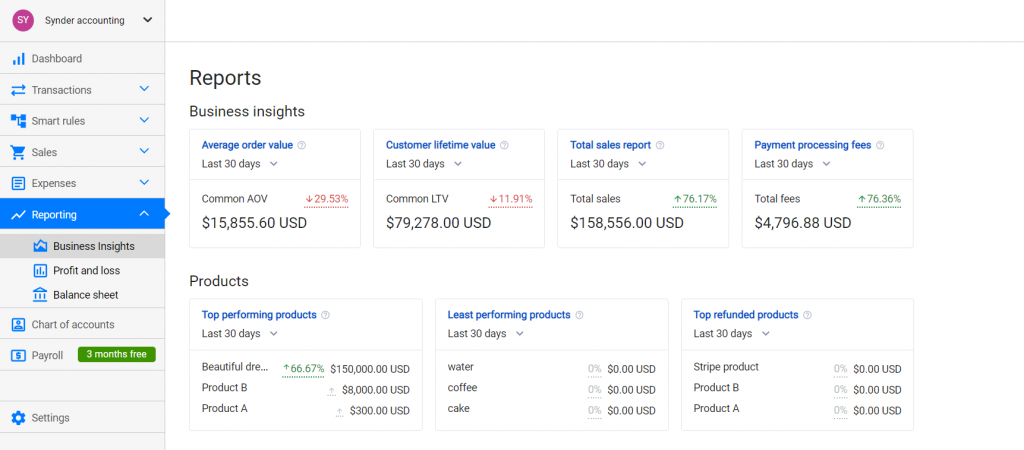
Why the Reconciliation Feature Deserves an Award
I’m not exaggerating when I say that reconciliation is where Synder really separates itself from typical syncing tools. Most software will send data to your books, but you still have to manually tidy up the aftermath.
Synder doesn’t just send data—it organizes it with the precision of someone who actually knows what accountants look for. Every fee is placed correctly. Every refund links back to the original sale. Every payout from your payment processors is broken down in a way that mirrors your bank deposits perfectly.
The result? When you open your accounting software, it doesn’t look like a battlefield. Everything feels strangely calm and structured. Even accountants have admitted that it cuts their workload dramatically.
I once heard a business owner describe it perfectly: “Before Synder, reconciling PayPal transactions felt like trying to solve a murder mystery. After Synder, it’s like matching socks.”
Invoicing That Doesn’t Feel Like a Chore
If your business also deals with clients or services, you’ll appreciate how Synder handles invoicing. Instead of sending plain invoices that look like a generic template from 2008, you can design something clean and reliable. You can also embed payment buttons, set automatic reminders, or create recurring billing for customers you invoice monthly.
The whole experience feels surprisingly smooth, and customers respond faster simply because paying becomes easier. It reduces the awkward follow-up emails and the “Did you get my invoice?” messages that no one enjoys sending.
The Power of Automated Rules (Your New Best Friend)
One of the most underrated features in Synder is the ability to create smart rules. Think of rules as teaching the software your preferences once—after that, it remembers forever.
For example, if you want all Amazon FBA fees to go to your specific “Amazon Expenses” category, you only set it up once. Or if you want every Shopify shipping charge to land in your “Shipping Income” account, it happens automatically from that moment on.
It’s like training a new assistant during the first week, and then they flawlessly take over the entire task for the rest of time.
A Real-Life Scenario: The Before and After
Let’s imagine you’re running a small brand selling phone accessories online. You make sales on Shopify, occasionally sell on Amazon, and use PayPal and Stripe for payments. Every week, without fail, you sit down with a coffee and prepare for two painful hours of bookkeeping.
You open Shopify to check the orders.
You open Stripe to check the payouts.
You open PayPal to check the fees.
You try to remember how you handled refunds last month.
You hope you don’t miss anything.
You hope nothing duplicates.
You hope nothing breaks your books.
Now imagine the same week after setting up Synder.
You don’t check anything manually.
You don’t import spreadsheets.
You don’t reconcile small fee discrepancies.
You don’t waste hours mentally tracking down mismatched numbers.
Instead, everything syncs automatically in the background. When payout day arrives, your accounting software already knows exactly what happened. You click “Match” once, and that’s it.
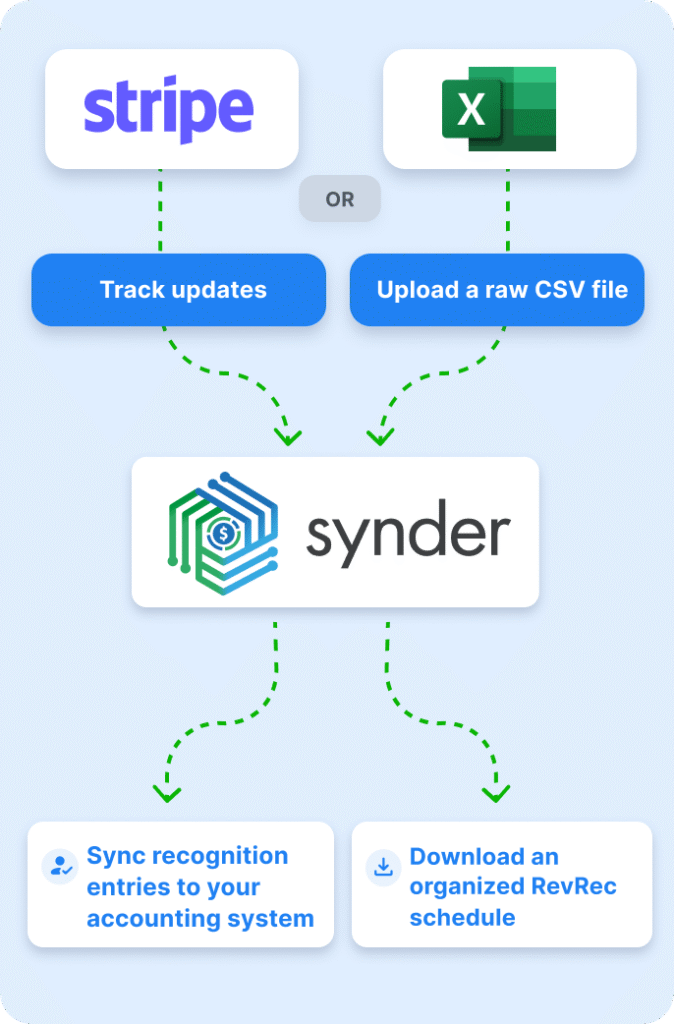
The difference feels like switching from hand-washing clothes to using a modern washing machine.
How Synder Helps During Tax Season
Tax season is where people truly appreciate Synder. Instead of scrambling to compile sales tax reports, search for missing income, or calculate fee deductions manually, you simply tell your accountant: “Everything is already synced.”
Because Synder records every detail at the time of the transaction—not months later—you get cleaner profit and loss statements, more accurate tax deductions, and fewer unpleasant surprises. It’s also much easier to show auditors where data came from because everything is traceable down to the smallest fee.
The Learning Curve: What You Should Expect
Now, to be honest, Synder isn’t the kind of software you set up in five minutes and walk away from. The onboarding requires attention, especially if your books have been messy for a while. But the setup is guided, and support is quick to respond.
Once you get past the initial configuration, the payoff is huge. Most people say the same thing: “It felt like a lot the first day, but by day three, I couldn’t imagine going back.”
And that’s fair. Any tool that handles financial data should require care during setup.
Pricing: What You’ll Pay, and What You Get
Alright, now to the numbers—because budget matters.
Synder offers a free trial (15 days) so you can test things out before committing.
When you choose a paid plan, pricing depends on your transaction volume (how many sales/transactions you’re syncing) and whether you pay monthly or annually. For example: the “Basic” plan starts around US $52 per month (when billed annually) for businesses up to ~500 transactions/month. For larger businesses—those syncing thousands of transactions monthly—the “Pro” or custom plans start from around US $220 per month or more for higher volume and more advanced features.
It’s important to note: while lower transaction-volume users see good value, if your business spikes in volume you could be paying significantly more. The key is matching your anticipated transaction count to the plan. And yes, there are discounts if you pay yearly.
In short: expect to spend somewhere in the ballpark of $50-$100/month for a small multi-channel setup, and $200+ for a larger one with heavy volume. Make sure you check what “transaction” means in their terms, and whether your business growth will push you into a higher tier.
Where Synder Could Be Better
No software is perfect. And to sound genuinely human here, I’ll tell you where Synder has room to improve.
Some users may feel overwhelmed by the number of options during onboarding. The platform is powerful, which means there are many switches, toggles, mapping options, and syncing preferences. It can feel a bit like sitting inside the cockpit of a plane for the first time.
Another thing is that the interface—while solid—may take a bit of exploring before it becomes second nature. Not confusing, not cluttered, but not instantly intuitive either.
That said, once you get used to it, everything clicks.
Who Benefits the Most from Synder?
If you’re selling products online and dealing with multiple payment processors or sales channels, you’ll probably find Synder life-changing. The more platforms you use, the more value it brings.
Accountants love it because it reduces cleanup work. Bookkeepers love it because it reduces errors. Business owners love it because it reduces stress. And frankly, your future self will love it because your books will finally look clean.
If you’re only running a tiny business with one payment processor and barely any transactions, Synder might feel like an unnecessary level of power. But if you’re growing—or want to grow—it becomes incredibly useful.
Final Verdict: Is Synder Worth It?
If your business relies on accuracy, smooth automation, and multi-platform bookkeeping (and let’s be honest, most modern businesses do), then yes—Synder is absolutely worth it. It saves time, reduces stress, minimizes errors, and makes reconciliation almost… enjoyable? Okay, maybe not enjoyable, but definitely painless.
The best part is that it doesn’t just fix your bookkeeping—it prevents problems before they ever appear. And in the world of accounting, prevention is everything.
So, if you want your books to finally make sense without sacrificing your weekends, Synder is a smart, dependable choice that feels like hiring a finance assistant who never sleeps, never gets tired, and never makes mistakes.
Read Our another Review: QuickBooks Review 2026: King of Small Business Accounting?

