
Luminar Neo Review –
Introduction: A New Era in Photo Editing
If you’ve ever spent hours trying to tweak shadows, replace skies, or remove an unwanted photobomber from an otherwise perfect shot, you’ll understand the appeal of Luminar Neo. It’s not just another photo editor; it’s more like that assistant who knows exactly what you want before you even ask. Developed by Skylum, Luminar Neo promises to make professional-level editing accessible—even if you’ve never opened Photoshop in your life.
But does it really live up to the hype? Or is it another piece of flashy software that dazzles in ads but disappoints in practice? Well, I’ve spent quite some time exploring it, testing its AI tools, breaking things, fixing them again, and learning what makes it tick. Here’s everything you need to know.
First Impressions: Clean, Calm, and Surprisingly Intuitive
The first thing that hits you when you open Luminar Neo is how uncluttered it feels. The interface is modern, airy, and doesn’t scream “tech overload.” You don’t get bombarded with twenty tabs and a hundred sliders. Instead, it’s divided into three main sections—Catalog, Presets, and Edit.
- Catalog lets you organize your photos and browse through them easily.
- Presets are quick one-click looks (great for beginners or lazy days).
- Edit is where the real magic happens—with dozens of AI-powered tools tucked neatly into side panels.
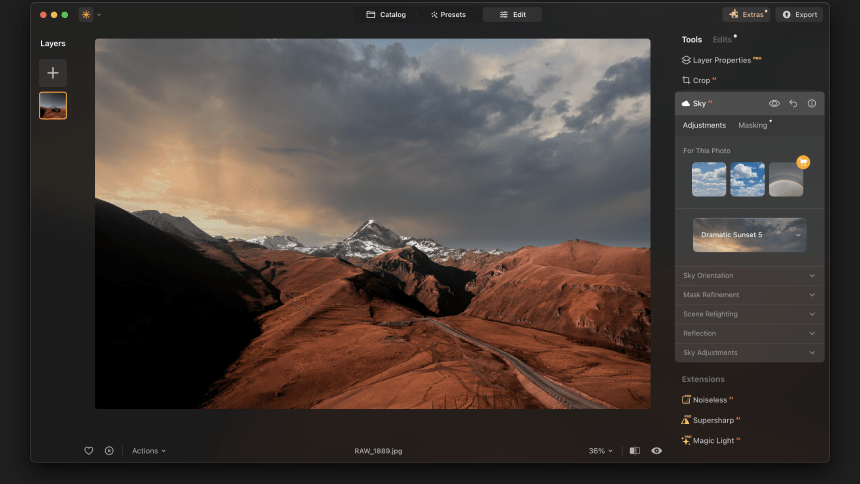
Compared to something like Adobe Lightroom, which can feel like a pilot’s cockpit, Luminar Neo feels more like sitting in a Tesla—clean controls, smart automation, but you still get the thrill of driving.
AI Done Right (Mostly)
Let’s get to the fun part—the AI. Skylum has baked in a suite of artificial intelligence features that are meant to save you time and effort. Now, before you roll your eyes at yet another “AI tool,” let me assure you: these aren’t gimmicks. Most of them actually work.
1. Sky AI
Imagine you’ve got a stunning mountain shot, but the sky? Dull, gray, lifeless. With Sky AI, you can literally swap it out in seconds. Choose from dramatic sunsets, fluffy clouds, or deep starry skies—and the software intelligently adjusts lighting and color to match. It even adds reflections in water if there’s any. The first time I tried it, I half expected the app to mess up the horizon, but no—it blended so naturally that I had to zoom in to believe it.
2. Relight AI
Ever taken a portrait where your subject’s face is in shadow while the background glows like a mini sun? Relight AI fixes that. It analyzes the depth of your image and allows you to brighten or darken foregrounds and backgrounds independently. It’s like adding studio lights after the fact. Pretty wild.
3. GenErase and Remove Power Lines
This one’s a lifesaver for travel photographers. You can remove distractions—random people, electric poles, wires, trash bins—with just a brush stroke. I tested it on a crowded street photo from Istanbul. With Photoshop, I’d need five minutes of cloning and healing. Here? Ten seconds. Done. And unless you zoom in like a forensic analyst, you’d never notice the edits.
4. Portrait AI & Skin AI
Portrait retouching used to be a delicate balance between “natural” and “plastic doll.” Luminar Neo’s Portrait AI walks that line quite well. It smooths skin, enhances eyes, whitens teeth, and even slims the face slightly—but it keeps textures intact. You can adjust the intensity, so you’re never stuck with that over-edited Instagram filter look. It’s like having a makeup artist and a lighting expert built into your laptop.

Editing Without Tears: A Workflow You’ll Actually Enjoy
One of the biggest issues with most photo editors is the learning curve. Luminar Neo keeps things simple without dumbing them down. Everything is non-destructive, meaning you can go back and tweak edits anytime. It’s forgiving—which is great for creative experiments.
The editing layout is divided into logical tool groups: Essentials, Creative, Portrait, and Professional. Each contains relevant features, from basic exposure adjustments to advanced noise reduction.
For example:
- In Essentials, you’ll find tools like Develop (similar to Lightroom’s base adjustments), Enhance AI (which automatically boosts contrast, color, and clarity), and Structure AI (which sharpens detail intelligently).
- The Creative tab is where your inner artist can run wild—add fog, sun rays, film grain, or that cinematic color tone you see in travel magazines.
- The Professional section has more technical options like Color Harmony, Supercontrast, and Dodge & Burn for precise adjustments.
There’s something oddly satisfying about sliding a control and instantly seeing the change take shape without lag or crashes (I’m looking at you, some other editors).
Presets & Looks: Fast but Flexible
If you’re a casual photographer or someone who just wants to make photos pop without diving into manual sliders, Luminar Neo’s Presets are a dream. They’re categorized by style—Portrait, Landscape, Cinematic, Macro, etc.—and each preset can be adjusted afterward.
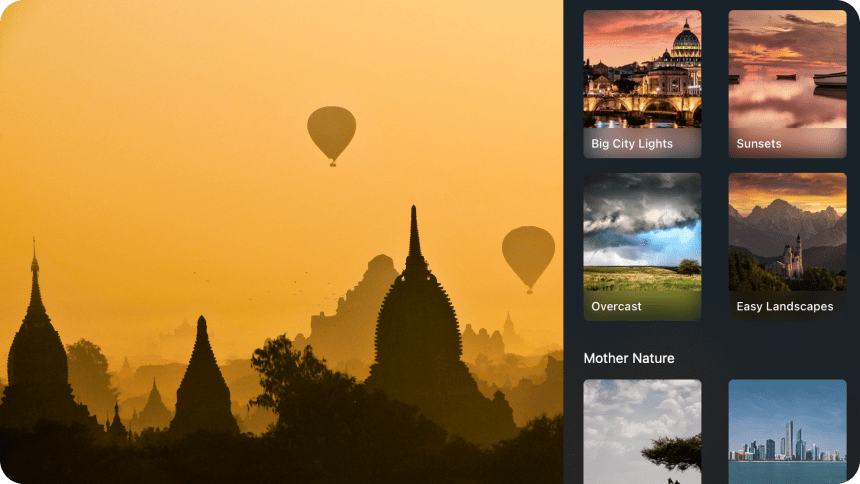
It’s not a one-click “Instagram filter” situation. Think of it as a smart suggestion. You click a preset, and Luminar Neo gives you a solid starting point. From there, you can fine-tune everything until it fits your vision. It’s the perfect balance between automation and artistic control.
Real-Life Use: Where Luminar Neo Shines (and Where It Stumbles)
Let’s be real—no software is perfect. Luminar Neo shines brilliantly in certain areas and stumbles in a few others. Here’s how it performs in practical scenarios:
Landscapes: A Photographer’s Playground
This is where Luminar Neo absolutely thrives. Sky AI, Structure AI, and Supercontrast can turn a flat landscape into something out of National Geographic. You can control the mood—dramatic and moody, soft and golden, or bright and vibrant—with minimal effort. Add a few sun rays, tweak the shadows, and boom—postcard perfection.
Portraits: Smooth, Natural, and Realistic
If you shoot portraits, you’ll appreciate how subtle the retouching feels. The software doesn’t automatically airbrush everything into oblivion. Instead, it enhances natural beauty while keeping realism intact. You can even adjust lighting direction and catchlights in the eyes, which is something most other editors don’t offer.
Cityscapes and Travel Photography
Here’s where AI erasing tools steal the show. Removing power lines or tourists from a landmark photo feels like magic. However, on complex backgrounds—like a patterned wall—the erasing can sometimes blur slightly. It’s not a dealbreaker, but worth noting if you’re aiming for pixel perfection.
Batch Editing
Yes, you can apply the same edits to multiple photos. It’s a bit less advanced than Lightroom’s syncing features, but for most users, it gets the job done. The real advantage is that Luminar Neo’s AI understands scene context, so edits adapt subtly to each image rather than blindly applying identical settings.
Performance: Smooth Sailing (Mostly)
Performance is where opinions tend to split. On a decent machine (say, an i5/i7 processor with 16 GB RAM), Luminar Neo runs smoothly. The AI tools take a second or two to process, but it’s reasonable. On older systems, though, you might experience occasional slowdowns, especially when working with large RAW files.
The good news? The software has been getting frequent updates that noticeably improve speed and stability. Earlier versions had some hiccups, but Skylum seems to be listening to user feedback and polishing things up.
Integration and Compatibility
Luminar Neo works both as a standalone app and as a plugin for Adobe Lightroom Classic or Photoshop. So, if you’re already knee-deep in Adobe’s ecosystem, you can still use Neo for specific AI edits and then jump back seamlessly.
It supports most popular image formats—RAW, JPEG, TIFF, PNG, and even HEIC (the iPhone format). Exporting is straightforward, with customizable quality and size options.
Subscription or Lifetime: The Eternal Debate
Here’s where Luminar Neo has an edge. While most software these days locks you into monthly subscriptions, Skylum offers both options—subscription and lifetime license. You can buy it outright and own it forever, or opt for a yearly plan that includes access to future extensions and new AI features.
Honestly, it’s refreshing to have a choice. Some photographers prefer one-time purchases; others like staying up to date with the latest tools. Luminar Neo caters to both camps.
Imperfections: The Not-So-Polished Corners
As much as I like Neo, I’d be lying if I said it’s flawless.
- Catalog Management: It’s not as robust as Lightroom’s. You can organize photos, yes, but advanced tagging, keywording, or smart collections are limited. If you’re managing thousands of images, you might find this frustrating.
- Occasional Lag: Especially when applying heavy AI effects to multiple large RAW files. It’s improving, but it’s still there.
- Interface Consistency: Sometimes, labels or tool placements feel slightly inconsistent. You’ll get used to it, though.
- Export Speed: It’s decent but could be faster when handling batches.
These aren’t dealbreakers, but they remind you that Neo is still evolving. Skylum’s updates usually fix or improve things within months, so it’s clear they’re committed to refinement.
Real-World Analogy: Luminar Neo Is Like an Electric Car for Editing
Think of traditional editors like Lightroom and Photoshop as powerful manual vehicles—great performance, but you need skill to drive them. Luminar Neo? It’s the Tesla of photo editing. You still have control, but automation handles the heavy lifting. You can focus on the creative journey, not the technical detours.
And like a Tesla, once you get used to that effortless experience, it’s hard to go back to shifting gears manually.
Who Should Use Luminar Neo?
- Beginners who want professional-looking results without spending months learning complicated tools.
- Enthusiasts and hobbyists who love experimenting and creating eye-catching images for social media or portfolios.
- Professionals who want a secondary tool to speed up repetitive edits (especially sky replacements, noise reduction, and object removal).
- Travel photographers who deal with messy backgrounds, unwanted people, or inconsistent lighting.
If you fall into any of these groups, Luminar Neo is absolutely worth trying.
A Few Hidden Gems You Might Miss
While most people focus on big AI tools, there are some subtle but brilliant features tucked inside:
- Color Harmony: A fine-tuned color grading tool that lets you balance warmth, brilliance, and contrast in a single panel.
- Mystical and Glow Effects: Perfect for dreamy portraits or magical forest scenes.
- Sunrays Tool: It’s not new to Luminar, but it’s still one of the best. You can place a sun source anywhere, and the rays adapt naturally to objects in your photo.
- Mask AI: It automatically detects subjects, skies, humans, mountains, and even vegetation, letting you create complex masks with one click.
These little touches make the software feel more personal and artistic—less like a machine, more like a creative partner.
Verdict: So, Is Luminar Neo Worth It?
Actually, yes. And here’s why.
Luminar Neo manages to do what many photo editors struggle with—it bridges the gap between simplicity and sophistication. It’s approachable enough for newcomers, yet powerful enough for seasoned photographers who value speed and creativity.
Is it going to replace Photoshop entirely? Probably not. But it doesn’t need to. It shines in its own lane: fast, intelligent, visually-driven editing. If your goal is to enhance photos without losing your weekend to sliders and layer masks, Luminar Neo is your ally.
Well, in a world where we all have less time but higher standards for visual content, that’s exactly what we need.
Final Thoughts
Luminar Neo isn’t just another editing app—it’s a glimpse into the future of creative software. A future where AI doesn’t replace the artist, but amplifies them. It doesn’t steal the brush; it just helps you paint faster and better.
Sure, there are rough edges, and perfection is still a few updates away. But if I had to sum it up in one line: Luminar Neo makes photo editing fun again. And that, my friend, is something worth celebrating.
Read Our another Review: QuickBooks Review 2026: King of Small Business Accounting?

