
Melio Review
If you run a small business, you already know the truth: managing payments is rarely the “fun” part. Invoices get buried under paperwork, due dates sneak up on you, and vendors want to be paid yesterday. Somewhere in between all of that, you’re expected to keep cash flow smooth and stay sane.
Well, that’s where Melio steps in—at least, that’s the promise. Marketed as a simple, modern way to pay vendors and manage B2B transactions, Melio has become a favorite among freelancers, local shops, and growing companies that want a payment system that doesn’t feel like it was built in 1998.
But does it really live up to the hype? Is it as easy, affordable, and intuitive as everyone claims? I spent time digging into its features, quirks, and real-world usefulness to help you decide whether Melio deserves a spot in your financial toolkit.

Let’s dive in—realistically, conversationally, and without any robotic jargon.
What Exactly Is Melio?
In the simplest terms, Melio is a bill-pay platform designed primarily for small businesses. Think of it as an organized middle-man that lets you:
- Pay vendors
- Schedule payments
- Track invoices
- Sync with QuickBooks
- Use credit cards for bills—even when vendors don’t accept them
Actually, the last one is the reason many businesses first hear about Melio. If your vendor insists on checks or bank transfers only, you can still use your credit card through Melio, and the platform sends the payment in your vendor’s preferred format. It’s a clever workaround that can unlock rewards points, extend cash flow, and eliminate those “But I don’t take cards!” headaches.
I like to think of Melio as the friend who handles awkward conversations for you—except in this case, the awkwardness is money.

Key Features of Melio
Vendor Payments Made Easy
With Melio, you can pay vendors by bank transfer or credit card, and they receive the funds however they want: ACH, check, or deposit. The best part? They don’t need their own Melio account to get paid.
Imagine this: You’re working with an old-school supplier who still mails out hand-written invoices and prefers checks. Using Melio, you hop in, enter the amount, pay with your credit card, and let the platform mail the supplier a check on your behalf. No more stamps. No more checkbooks. Zero stress.
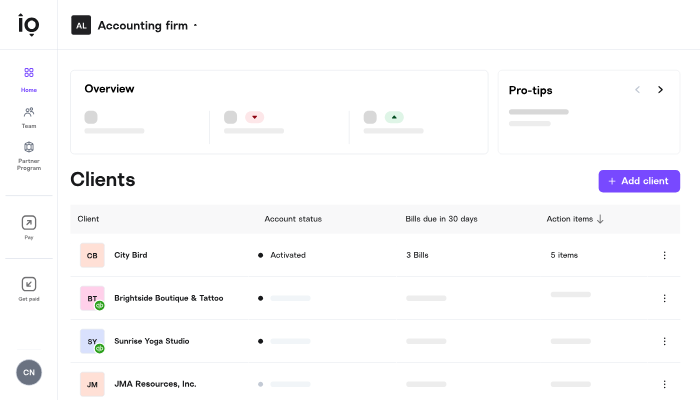
Approval Workflows
For teams, Melio includes role-based permissions, meaning you can designate who prepares bills, who approves them, and who has final payment authority. It prevents those “Wait, who sent $4,000 to this vendor?” surprises.
Schedule Payments in Advance
You can schedule payments ahead of time, which means no more setting reminders like:
- “Pay the cleaning service on Tuesday.”
- “Pay that contractor before the weekend.”
- “Don’t forget the monthly subscription fee!”
Once scheduled in Melio, the platform handles the timing. It’s like autopilot—just for business expenses.
Complete Sync With QuickBooks
The QuickBooks integration is one of Melio’s signature features. Bills appear automatically, and your payment data syncs back into your accounting system in real time.
If you’ve ever manually typed invoice IDs or cross-checked numbers until your eyes glazed over, this feature feels like a small miracle.
Receive Payments (Not Just Send Them)
While bill-pay is Melio’s bread and butter, it also allows you to get paid. You can generate a payment link and share it with clients. They can pay via credit card or bank transfer, and funds land in your bank account.
It’s perfect for freelancers or service providers who want simple, trackable payments without needing a fancy POS system.

Free Bank Transfers
One standout feature is that ACH payments through Melio are free. Considering some platforms charge monthly fees or transaction fees just to use their interface, Melio‘s no-subscription model is refreshing.
Pros of Using Melio
1. It’s Incredibly Easy to Use
Honestly, the interface feels like it was built with non-tech-savvy business owners in mind. Each step—uploading bills, scheduling payments, or sending invoices—feels intuitive.
Even if you “hate technology,” chances are you’ll still find Melio welcoming.
2. Big Cash Flow Benefits
Being able to pay bills with a credit card (even when vendors don’t accept them) is a game-changer. It buys you extra weeks before the charge hits your bank account.
For seasonal businesses—like landscaping companies or holiday retailers—that flexibility can mean the difference between a stressful month and a manageable one.
3. Great for Remote Teams
If your accountant is in another city and your operations manager works from home, no problem. You can collaborate inside Melio without messy email threads or spreadsheet juggling.
4. Transparent Pricing
No monthly fee. No setup fee. No cancellation drama. Melio keeps things refreshingly straightforward.
5. Vendor Doesn’t Need an Account
Some platforms force both parties onto the same system. Not here. Your vendors can get paid without signing up.
6. Perfect for Small and Midsize Businesses
Melio hits a sweet spot: simple enough for small businesses, but powerful enough for growing teams.

Cons of Melio
No tool is perfect, and Melio does have a few quirks worth mentioning.
1. Credit Card Payments Have Fees
Using a credit card to pay bills comes with a 2.9% fee. It’s standard in the industry, but still something to factor in.
2. Check Delivery Can Take Time
If your vendor prefers checks, the mailing time might slow the process down. Not terrible—just something to plan around.
3. Limited Global Payments
At the moment, Melio focuses heavily on U.S.-based transactions. International options exist but aren’t as robust as platforms dedicated to global commerce.
4. No Mobile App Yet
This is one of the most common complaints. Melio does work in mobile browsers, but a dedicated app would be more convenient.
Pricing: How Much Does Melio Cost?
Here’s the good news: Melio is free for most standard features.
Free Features
- Bank transfers (ACH)
- Bill management dashboard
- Invoice tracking
- QuickBooks sync
- Approval workflows
- Payment scheduling
Paid Features
- Credit card payments: 2.9% fee
- Expedited check delivery: additional fee
- International wire transfers: $20 per transaction
There’s no subscription fee at all—which is impressive considering the functionality you get. For many businesses, this alone makes Melio an easy “yes.”
Who Is Melio Best For?
After evaluating everything, Melio tends to be perfect for:
Freelancers
If you juggle clients and contractors, the ability to manage everything in one place is priceless.
Small Businesses
From local boutiques to home-based service companies, Melio is simple, affordable, and practical.
Accountants & Bookkeepers
The approval and workflow features make collaboration smooth.
Businesses Wanting to Optimize Cash Flow
Paying bills via credit card—even when the vendor doesn’t take cards—gives you more financial flexibility.
Teams Using QuickBooks
The two systems feel like they were made for each other.
Real-Life Example: How Melio Helps Day-to-Day
Let’s say you run a small interior design studio. You manage:
- Furniture suppliers
- Contractors
- Freelance artists
- Monthly software subscriptions
- Occasional project-based vendors
You don’t want to chase invoices or write checks, but you need to stay organized.
Here’s how your workflow looks with Melio:
- You upload supplier invoices as soon as they arrive—either manually or through QuickBooks syncing.
- You schedule payments for their due dates.
- For contractors who insist on checks, Melio mails them automatically.
- For the big furniture order, you pay with your credit card to earn points (and buy yourself extra float).
- You share a payment link with your clients so they can pay deposits conveniently.
- Everything logs smoothly into your accounting software.
Suddenly, instead of juggling paper, spreadsheets, texts, and Post-it reminders, you’re free to focus on actual business decisions.
How Melio Stands Out Against Competitors
There are lots of payment software options out there—Bill.com, PayPal, Wise, and others. But Melio holds its own by emphasizing simplicity and affordability.
Here’s what sets it apart:
- No monthly fees
- Super easy setup
- Familiar, modern interface
- Credit card flexibility
- Strong QuickBooks integration
Some competitors feel bloated or over-engineered for small businesses. Melio keeps things clean and functional.
Final Verdict: Is Melio Worth It?
In my opinion? Absolutely—if you’re a small or midsize business looking to simplify financial workflows, Melio delivers on its promises.
It’s not trying to be everything for everyone. Instead, it focuses on doing one thing exceptionally well: helping businesses pay and get paid without complexity. Between the free ACH payments, sleek interface, vendor-agnostic payment options, and cash-flow-friendly credit card features, Melio hits a sweet spot most payment platforms miss.
Sure, the lack of a mobile app and credit card fees may bother some users, but the platform’s benefits far outweigh its drawbacks.
If you’re tired of old-fashioned bookkeeping chaos and want a modern, user-friendly, budget-friendly solution, Melio is absolutely worth trying.
Read Our another Review: Luminar Neo Review 2026 — Best AI Photo Editor for Beginners?

