
Streak – CRM for Gmail Review: The Inbox-Native CRM You’ll Actually Use
If you’ve ever juggled client emails, deals, and follow-ups between ten different tabs, you know the chaos. One minute you’re replying to a lead, the next you’re lost in spreadsheets or some bulky CRM that feels like piloting a spaceship.
Well, what if your CRM simply lived inside Gmail — quietly working alongside your inbox, instead of demanding you visit yet another dashboard?
That’s exactly what Streak does. It’s a CRM designed for people who practically live in Gmail. Whether you’re managing sales, partnerships, hiring, or customer support, this clever tool wraps around your everyday email flow without breaking your rhythm.
Let’s unpack what makes Streak different, who it’s for, and whether it’s really worth the hype (and the subscription).
☕ First things first — What is Streak?
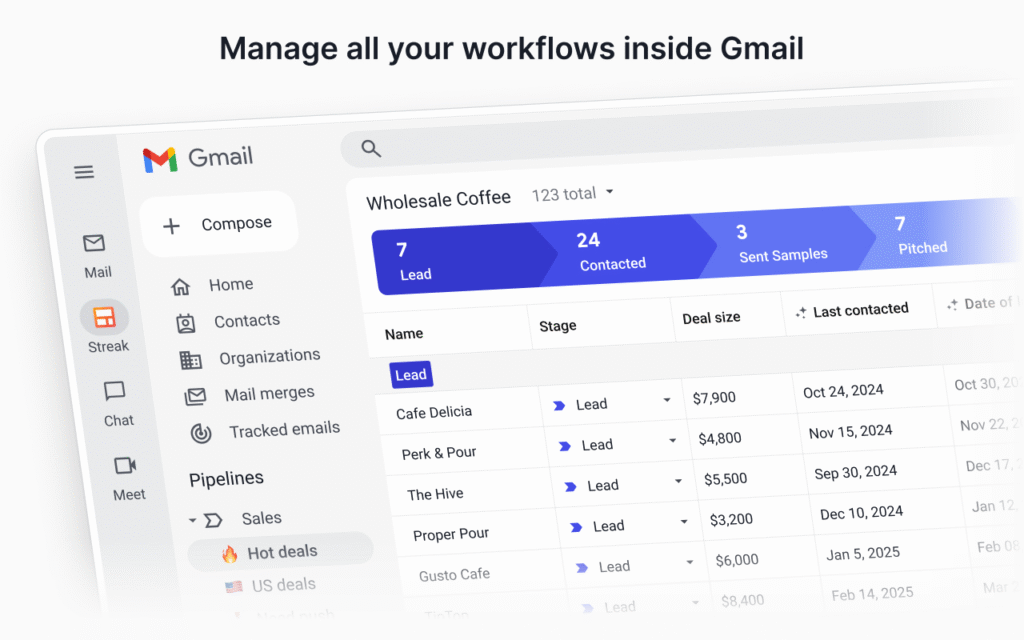
At its heart, Streak is a CRM (Customer Relationship Management) system that’s built directly into Gmail. No separate login. No new interface to learn. You open Gmail, and voilà — your CRM tools appear right there in your inbox sidebar.
Think of it like giving Gmail a serious upgrade. Suddenly, each email thread can be turned into a trackable “box” — that’s Streak’s term for deals, clients, tasks, or projects.
You can then organize these boxes into “pipelines.” Pipelines are basically visual stages that show where each contact or project stands — new lead, in discussion, demo scheduled, closed-won, etc.
It’s like transforming your inbox into a living spreadsheet that updates itself.
💡 Key Features That Make Streak Stand Out
1. Pipeline Management Without Leaving Gmail
Instead of opening another tab or app, you can build, view, and manage your entire sales or project pipeline from Gmail. Imagine: You reply to a potential client, then in one click, add that email to your “Leads” pipeline and mark them as “Contacted.”
You’ll see their entire history — every email, note, document, and stage — right there. It’s seamless and ridiculously intuitive.
2. Email Tracking (The “Did They Open It?” Superpower)
Let’s be honest. We all wonder: “Did they even read my email?”
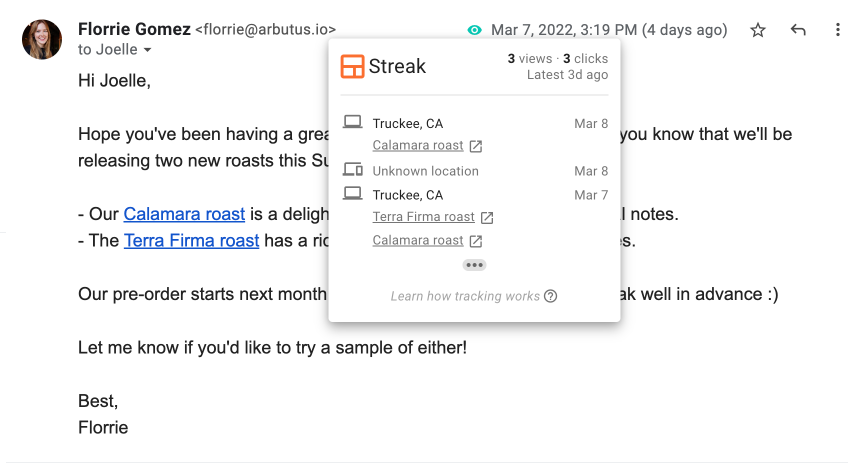
Streak gives you that superpower. You can track when someone opens your message and how many times they’ve looked at it. This is gold for salespeople, freelancers, or anyone doing outreach.
You’ll get a small eye-shaped icon in Gmail showing whether the email has been opened. No guessing games.
3. Mail Merge & Automated Follow-ups
If you’ve ever had to send 50 personalized emails, you know how painful that can be. With Streak, you can use mail merge templates that feel personal — using fields like first name, company name, etc.
Even better, you can schedule automatic follow-ups for those who don’t respond. Imagine saving hours each week, while still sounding human.
4. Custom Fields & Data Tracking
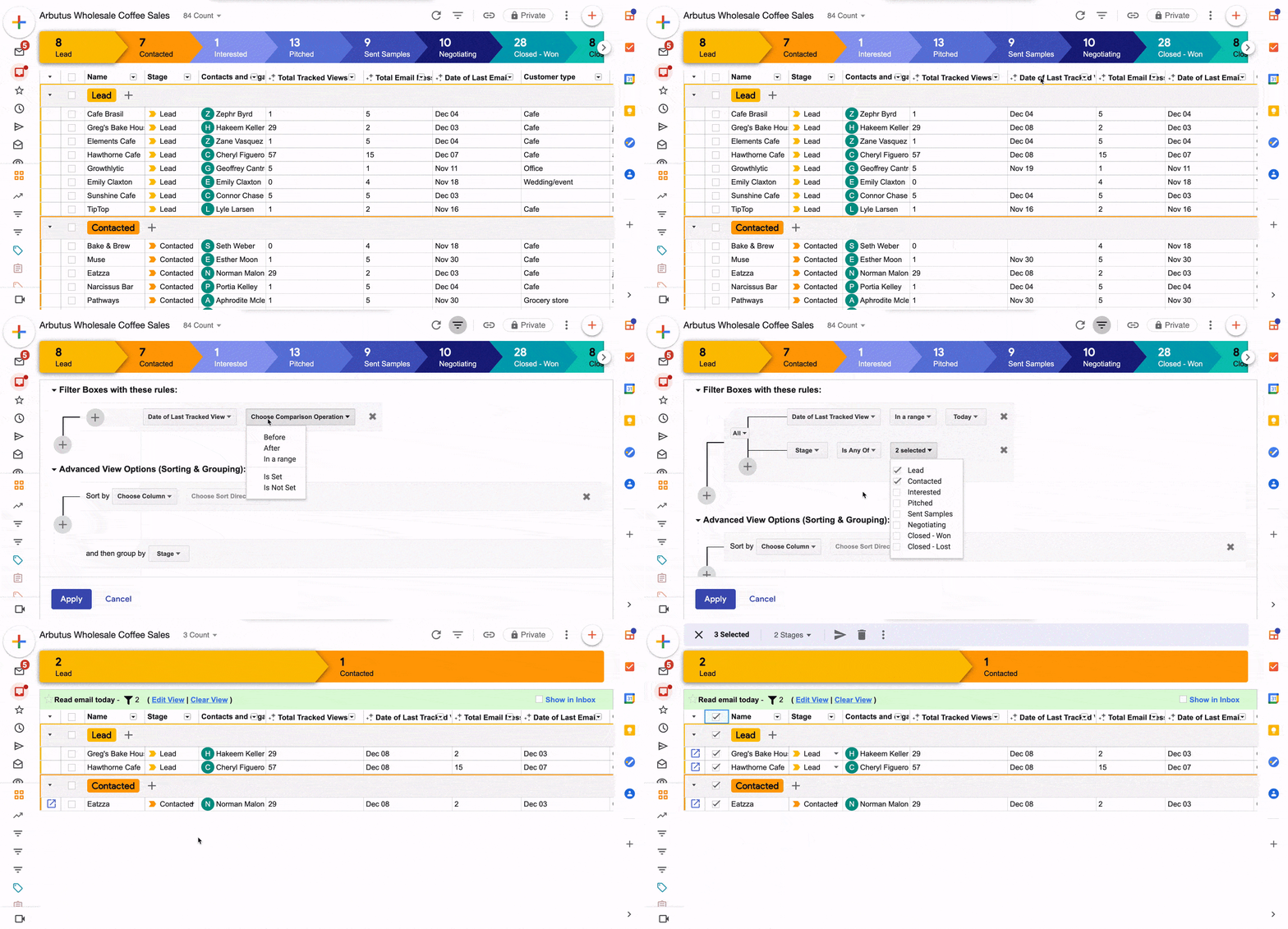
Need to track deal size, budget, client location, or next meeting date? You can create your own columns and custom fields in Streak. It’s like having the flexibility of a spreadsheet, but with the power of automation.
For example, if you’re a real estate agent, you might track:
- Property type
- Budget range
- Next viewing date
- Offer status
All neatly organized in Gmail.
5. Team Collaboration Made Simple
You can share pipelines with teammates, assign tasks, and add notes — all within Streak. When someone updates a client’s info, everyone sees it instantly.
It’s especially handy for small teams that can’t justify paying for massive enterprise CRMs.
6. Integrations & Mobile Access
Streak integrates with Google Workspace apps like Calendar and Drive, plus it connects to external tools via Zapier.
And yes, it has a mobile app — so you can check your pipelines or send tracked emails while standing in line for coffee.
🧠 Real-World Example: A Freelancer’s Secret Weapon
Let’s say you’re a freelance graphic designer named Alex. You get most of your client leads through email — inquiries, referrals, maybe the occasional Instagram DM that turns into a Gmail thread.
Before Streak, you’d probably manage all this with sticky notes or spreadsheets. But things slip through the cracks. You forget to follow up. You lose track of who’s paid or who’s still pending.
Now, with Streak, Alex can:
- Add each new inquiry to a “Leads” pipeline.
- Set stages like “Contacted,” “Proposal Sent,” “Negotiation,” “Closed.”
- See email open rates (so Alex knows if the client even read the proposal).
- Schedule follow-ups automatically.
It’s like having a quiet assistant living in your inbox, keeping you organized without you doing much extra work.
🔍 Who Is Streak For?
Streak works beautifully for:
- Freelancers & solopreneurs who want a lightweight CRM that lives where they already work.
- Small business owners who handle clients, deals, or projects over email.
- Sales teams that rely on Gmail for outreach.
- Recruiters or HR pros managing candidates and interview stages.
- Customer success reps tracking support tickets or client onboarding.
If you’re already using Gmail daily, Streak fits like a glove.
However, if you’re using Outlook, Apple Mail, or something else entirely, this one isn’t for you. It’s Gmail or bust.
💬 Pros of Using Streak
✅ 1. Incredibly Easy to Use
No bloated dashboards, no overwhelming learning curve. If you can use Gmail, you can use Streak. It’s that simple.
✅ 2. Saves Serious Time
Everything — tracking, follow-ups, notes, and pipelines — happens inside Gmail. You’re not switching tabs every five minutes.
✅ 3. Excellent for Small Teams
For startups or small businesses that don’t want to spend thousands on Salesforce or HubSpot, Streak hits the sweet spot.
✅ 4. Real-Time Email Insights
Knowing when and how often someone opens your email is more than curiosity — it’s strategy. It tells you who’s interested and when to follow up.
✅ 5. Customizable Pipelines
Every business is different. Streak lets you shape your CRM to fit your process — not the other way around.
⚠️ Cons (Because Nothing’s Perfect)
❌ 1. Gmail Dependency
If you’re not using Gmail or Google Workspace, Streak simply won’t work. Period.
❌ 2. Limited for Big Enterprises
Large organizations that need advanced analytics, forecasting, or complex automation might outgrow Streak. It’s perfect for lean teams — less so for 500-person sales departments.
❌ 3. Pricing Can Add Up
The free version is solid, but as soon as you need team features, permissions, or advanced reports, you’ll have to move up to a paid plan. (More on that below.)
❌ 4. Occasional Lag in Heavy Inboxes
If your Gmail account has tens of thousands of emails, you might notice a bit of slowdown when loading pipelines. Nothing major, but worth mentioning.
💰 Pricing Breakdown
Here’s where Streak becomes even more appealing — it’s actually affordable.
As of now, pricing is structured in tiers:
| Plan | Monthly (per user) | Best For |
|---|---|---|
| Free | $0 | Individuals testing CRM basics |
| Pro | Around $49 | Small businesses / growing teams |
| Pro+ | Around $69 | Large businesses / growing teams |
| Enterprise | Around $129 | Large orgs needing integrations & permissions |
Let’s be real — even at $49, Streak is cheaper than most CRM giants that start at $75–$100 per user.
If you’re just one person, the free plan already gives you pipelines, tracking, and a great feel for the system. Upgrading just adds more collaborative and automation perks.
📱 The User Experience: Clean, Familiar, Effortless
Unlike traditional CRMs that force you to learn their ecosystem, Streak works with what you already know — Gmail.
No more tab fatigue. You just click the Streak icon inside Gmail, and you’re managing leads, adding notes, setting reminders, or checking open rates in seconds.
It’s like Gmail suddenly grew superpowers overnight.
🧩 Compared to Other CRMs
So, how does Streak stack up against the competition?
- Versus HubSpot: HubSpot has deeper analytics and marketing tools, but it’s heavier and more complex. Streak wins on simplicity and Gmail integration.
- Versus Pipedrive: Pipedrive’s UI is slick, but it’s another separate platform. Streak keeps you right in Gmail.
- Versus Monday.com or ClickUp: Those are more project-management hybrids. Streak is pure CRM baked into your daily workflow.
If you’re after lightweight power instead of sprawling features, Streak feels like the right fit.
💭 Final Thoughts: Is Streak Worth It?
Actually, yes — and not just because it’s easy or inexpensive. It’s because Streak respects your time.
It doesn’t make you change how you work. It adapts to how you already do things. That’s rare in software.
For freelancers, small businesses, agencies, or anyone who lives in Gmail — Streak is a no-brainer. It’s the kind of tool that quietly runs in the background, saving you from chaos without demanding attention.
Sure, it’s not a full-blown marketing machine like Salesforce. But it doesn’t try to be. It’s smarter — and simpler — than that.
If you’re tired of switching between inboxes, CRMs, and spreadsheets, give Streak a try. You might find that the best CRM isn’t a new platform — it’s just the Gmail you already love, upgraded.

