WebCatalog Review:
Browsers were never designed for the way people work today.
That might sound dramatic, but think about your average workday for a second. You probably open Gmail in one tab, Slack in another, then maybe Notion, Trello, ChatGPT, Canva, Spotify, WhatsApp, and a dozen random pages you swear you’ll revisit later. A few hours pass, and suddenly your browser looks like a digital junk drawer.
That’s where WebCatalog enters the picture.
At first glance, it seems simple. It turns websites into desktop apps. Plenty of tools already do that, so you might wonder why people are suddenly paying attention to this one. Fair question.
The difference is that WebCatalog doesn’t just create shortcuts. It creates isolated environments for every app you use. Your work accounts stay separate from personal ones. Notifications behave more naturally. Your desktop feels cleaner. Oddly enough, your brain does too.

After spending time with it, I started understanding why remote workers, freelancers, agencies, and productivity obsessives keep recommending it.
And honestly? It’s one of those tools that sounds unnecessary until you actually use it.
What Exactly Is WebCatalog?
In plain English, WebCatalog is a desktop application platform that lets you install web apps as standalone desktop programs on Windows, macOS, and Linux.
Instead of keeping everything trapped inside browser tabs, you can run apps like Gmail, Discord, ChatGPT, Notion, Spotify, or WhatsApp as separate desktop applications.
But the real magic isn’t the app conversion itself. It’s the isolation.
For example, imagine managing multiple Gmail accounts every day. Normally, you either keep switching browser profiles or constantly logging in and out. It’s annoying, repetitive, and surprisingly distracting.
With WebCatalog, each account can run independently. One Gmail for work. One for personal use. Another for clients if you want. No overlap. No confusion.
That sounds like a small thing until you realize how much mental friction it removes from your workflow.
First Impressions: Surprisingly Clean
Some productivity apps feel overwhelming the moment you install them. Too many menus. Too many toggles. Too many “advanced systems” nobody asked for.
Thankfully, WebCatalog avoids that trap.
The interface is refreshingly straightforward. You open the app, search for the service you want, click install, and you’re done. No complicated setup process. No unnecessary tutorials trying to sound motivational.
Actually, the simplicity is one of its best qualities.
The app library is huge too. Most major web services are already available. Slack, Netflix, YouTube, LinkedIn, Figma, Google Drive, Telegram, Zoom — it’s all there.
And if a website isn’t included? You can manually create your own app in seconds.
That flexibility makes the platform feel much more useful long-term.
The Feature That Changes Everything: Spaces
This is where WebCatalog becomes genuinely interesting.
The platform includes something called “Spaces,” which are basically isolated browser environments. Think of them like separate digital rooms.
You could create:
- a work space,
- a personal space,
- a client management space,
- or even a dedicated research environment.
Each one has its own cookies, sessions, logins, and storage.
Now, here’s why that matters.
Most people don’t realize how mentally exhausting constant account switching can be. One minute you’re answering client emails. The next minute your personal YouTube recommendations appear. Then a private WhatsApp notification pops up while you’re presenting during a meeting.
Everything blends together.
WebCatalog creates boundaries between those environments. It feels cleaner psychologically, not just visually.
And yes, that genuinely improves focus.
Daily Workflow Feels More Organized
I think this is the biggest reason people end up sticking with the platform.
Using websites as standalone apps changes the feeling of your workflow.
Slack feels like an actual communication app instead of “just another tab.” ChatGPT feels more like a dedicated assistant. Spotify behaves like real desktop software. Even Gmail somehow feels less chaotic.
There’s a subtle but important difference between opening a browser and opening an app.
One invites distraction.
The other feels intentional.
That might sound exaggerated, but after a few days, you start noticing it.
Actually, going back to traditional browser tab overload starts feeling strangely outdated.
Performance and Speed
Now let’s talk about performance, because this is where some users get unrealistic expectations.
Since WebCatalog is Chromium-based underneath, it’s not magically weightless. If you open twenty heavy apps simultaneously, your RAM will absolutely notice.
Still, the experience often feels smoother than keeping everything inside a single browser session.
Apps crash independently instead of taking your whole browser down. Notifications work more consistently. Windows stay organized. Memory usage feels easier to manage because everything is compartmentalized.
So no, it won’t turn a weak laptop into a supercomputer.
But for normal professional workflows, it absolutely creates a calmer and more stable environment.
Who Will Benefit Most From It?
Not everybody needs WebCatalog. That’s important to say honestly.
If you casually browse the web and only use a few services, your regular browser is probably enough.
But certain people will immediately understand the value.
Freelancers are a perfect example. Managing multiple client accounts every day can become a nightmare inside standard browsers. Accidentally posting from the wrong LinkedIn account or sending emails from the wrong Gmail profile happens more often than people admit.
Social media managers benefit heavily too. Keeping different Instagram, Facebook, TikTok, and X accounts separated makes life much easier.
Remote workers are another obvious audience. Modern remote work revolves around web applications. When those apps become organized desktop tools instead of cluttered tabs, the entire workday feels more manageable.
Even developers and startup founders tend to love it because of the clean separation between projects.
Pricing: Is It Worth Paying For?
One thing I appreciate about WebCatalog is that the free version isn’t useless.
A lot of software companies intentionally cripple their free plans until they’re barely functional. Thankfully, that’s not really the case here.
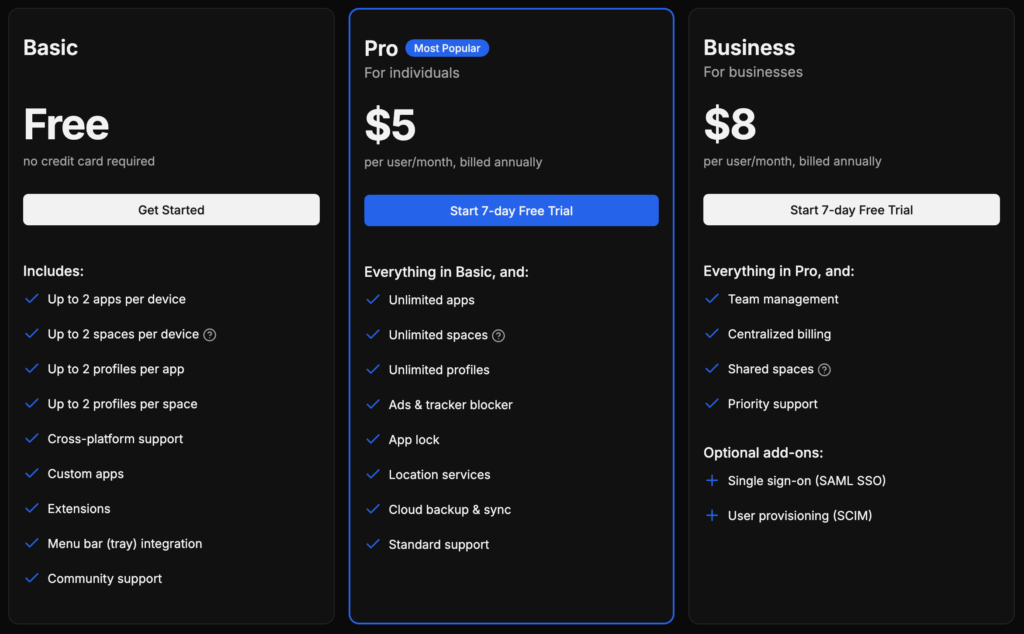
The free version gives you access to the core experience, including app installation and basic workspace functionality. Casual users can comfortably stay on the free plan for quite a while.
The paid version unlocks advanced features like unlimited Spaces and deeper customization tools.
For professionals juggling multiple accounts daily, the upgrade makes sense pretty quickly. The productivity gains aren’t dramatic in a flashy way, but they compound over time.
Less friction.
Less confusion.
Less wasted time.
That adds up.
The Downsides Nobody Mentions Enough
Well, no software is perfect.
One issue is resource consumption. Since the system relies on Chromium, heavy multitasking can still become demanding. Users expecting ultra-light performance may feel disappointed.
There’s also the fact that some websites simply aren’t optimized to behave like desktop applications. Occasionally, certain apps feel slightly awkward outside a normal browser environment. That’s more of a web app limitation than a WebCatalog problem, but it still matters.
And honestly, some people just prefer traditional browsing habits. They enjoy having everything inside one browser window. If that’s your style, this platform might feel unnecessary.
The learning curve around Spaces and isolated environments can also confuse less technical users initially.
Still, most people adapt fairly quickly.
Security and Privacy
A lot of users ask whether WebCatalog is safe.
Generally speaking, yes.
The platform uses isolated containers for apps, which reduces account contamination and cross-session tracking. That separation is especially valuable for professionals managing multiple identities or sensitive client accounts.
Of course, it’s not a privacy miracle tool. It won’t make you anonymous online, and it’s not a substitute for proper cybersecurity practices.
You still need strong passwords, two-factor authentication, and common sense.
But the account isolation itself definitely adds a layer of organizational security.
Final Verdict
So, is WebCatalog worth using?
For the right person, absolutely.
It doesn’t reinvent the internet. It doesn’t use flashy AI buzzwords. It simply solves a modern problem surprisingly well: browser chaos.
That’s really the heart of it.
Modern work lives inside web apps, but browsers were never built to manage dozens of identities, workflows, and platforms elegantly. WebCatalog creates structure where browsers create clutter.
And that structure feels good.
Your workspace becomes calmer. Your accounts stay separated. Your apps feel more intentional. Small annoyances disappear quietly in the background.
Those improvements sound minor individually, but together they change the rhythm of your workday.
Not everyone will need it. Casual users can probably ignore it completely.
But freelancers, agencies, remote workers, startup teams, marketers, and heavy multitaskers? There’s a strong chance you’ll end up wondering how you managed without it.
Read Our another Review: ActiveCampaign Review (2026): Full Test of Automation, CRM & Pricing